
Quick Summary:
|
NetSuite GDPR compliance is a shared job. Oracle provides the platform's security, certifications and privacy tools, while your organization configures NetSuite, handles data subject requests, sets retention and keeps records. This checklist shows finance and IT teams what to check, who owns each step and where NetSuite's built-in tools help. |
Introduction: What Does NetSuite GDPR Compliance Actually Require?
NetSuite GDPR compliance requires two things working together. Oracle, as the cloud provider, supplies the platform's security controls, certifications and privacy tools. Your organization, as the data controller, must configure NetSuite correctly, control access, answer data subject requests, set retention rules and document what it does.
No software makes a company compliant on its own. This guide gives finance and IT teams a practical checklist, based on Oracle's published documentation, for using NetSuite in a way that supports GDPR.
This guide is general information, not legal advice. Confirm your obligations with your data protection officer or legal counsel.
|
Market Context: The cost of getting this wrong is high. GDPR sets two fine tiers under Article 83: up to €10 million or 2% of worldwide annual turnover for organizational duties such as security and breach notification and up to €20 million or 4% for breaches of core principles and data subject rights, whichever amount is higher. On the provider side oracle says NetSuite's adherence to the EU Cloud Code of Conduct has been verified and that Oracle's Binding Corporate Rules for Processors have been authorized by European data protection authorities. Those commitments cover Oracle's role as processor, not yours as controller. Source: Kukie, GDPR fines under Article 83 |
Is NetSuite GDPR Compliant?
NetSuite provides what a processor should: documented security controls, independent audits and tools that help customers meet GDPR duties. Whether your use of NetSuite is compliant depends on how you configure and run it.
That distinction matters. Calling a platform "GDPR compliant" can sound like a guarantee but compliance describes how personal data is processed and you decide that.
What Oracle publishes about NetSuite includes:
- Independent audits - SOC 1 Type 2 and SOC 2 Type 2 reports.
- Security and privacy standards - ISO 27001 and ISO 27018, plus PCI DSS.
- Processor commitments - Verified adherence to the EU Cloud Code of Conduct and authorized Binding Corporate Rules for Processors.
- Product guidance - Feature guidance documents describing how NetSuite functionality can assist with customer privacy requirements.
So, is NetSuite GDPR compliant? As a platform it supplies what a processor should and your configuration decides the rest. Your side of the checklist is covered in the sections that follow.
What Does NetSuite Security Compliance Cover?
NetSuite security compliance covers how Oracle protects the platform itself. It is the foundation your own controls sit on.
According to NetSuite, the service is audited to SOC 1 Type 2 and SOC 2 Type 2 standards and maintains ISO 27001, ISO 27018 and PCI DSS compliance. Oracle also reports a dedicated security team with round-the-clock monitoring.
These certifications reduce what you need to verify about the infrastructure. They do not cover how you set up roles, who has access or how you handle requests, which remain your responsibility.
Which NetSuite Security Features Support GDPR?
NetSuite security features give you the controls to limit and track access to personal data. Use them deliberately.
- Encryption - NetSuite encrypts credentials and data in transit, supports custom attribute encryption and provides encryption APIs.
- Role-level access - Roles can restrict users to the data and features their jobs need, down to the field level.
- Audit trail - NetSuite tracks transactions by user login and timestamps each change.
- Multi-factor authentication - A role can require a verification code from an authenticator app or a mobile message.
- Password policies - Length, complexity, expiry and lockout after repeated failures are configurable.
- Token-based authentication - Applications connect with tokens, not user passwords.
What Is the NetSuite GDPR Compliance Checklist for Finance and IT Teams?
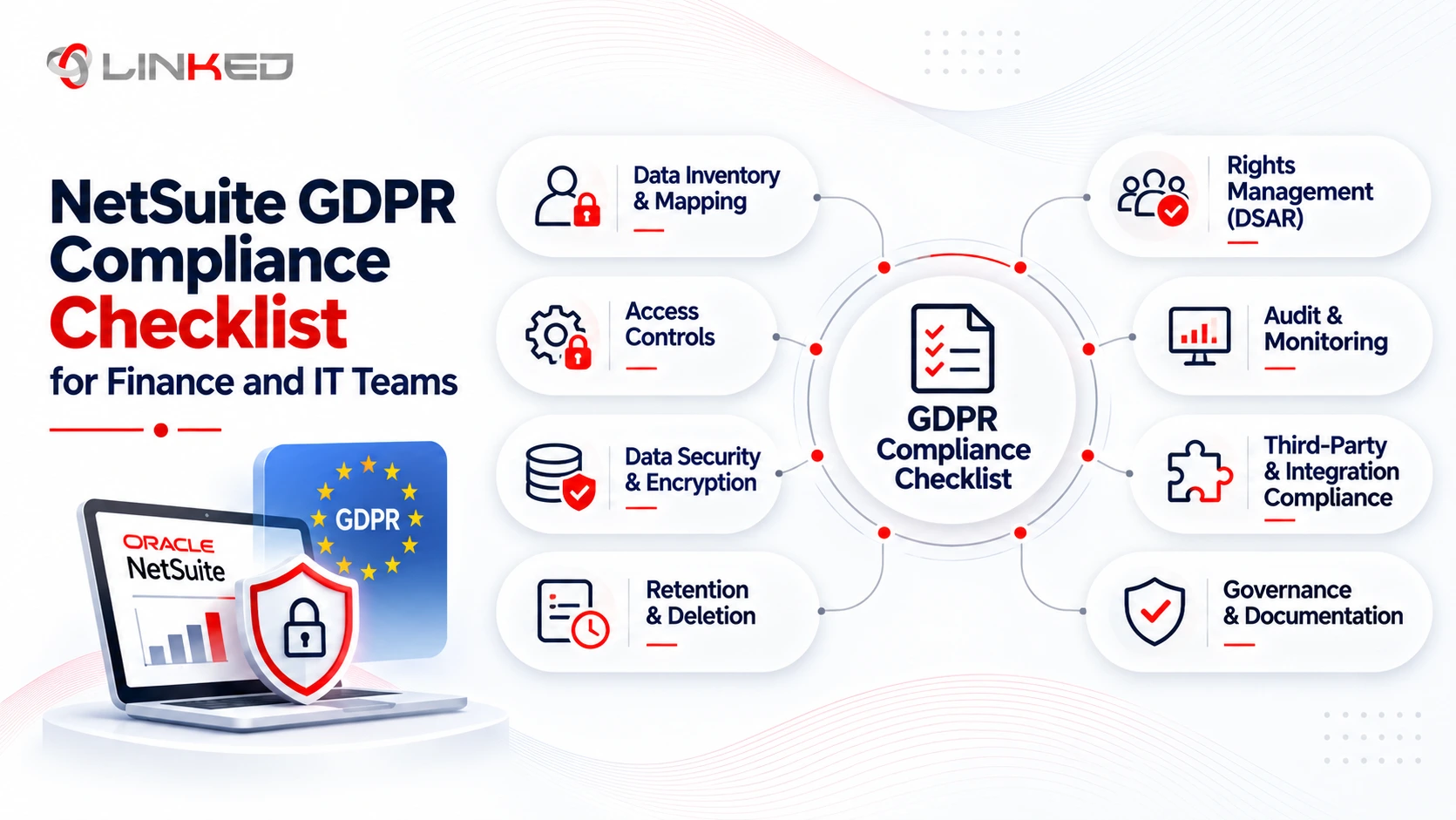
The NetSuite GDPR compliance checklist for finance and IT teams has eight areas: contracts and roles, personal data mapping, access and authentication, data subject requests, retention and erasure, integrations and third parties, breach preparation and documentation and review. Finance usually leads on records and retention decisions, IT leads on technical controls and both share requests, breach response and the annual review.
Work through the areas in order. The split between finance and IT is summarized in the ownership section further down.
1. How Do You Confirm Contracts and Roles?
Start with the legal basics. Under GDPR, your organization is the controller and Oracle is the processor for personal data you put in NetSuite.
- Data Processing Agreement - Confirm which Oracle data processing terms apply to your NetSuite order and keep a copy.
- Roles - Record who is controller and who is processor, including any partner with access.
- Transfers - If personal data leaves the EU or EEA, confirm the transfer mechanism with counsel.
- Owner - Name one person responsible for NetSuite privacy decisions.
2. How Do You Map Personal Data in NetSuite?
You cannot protect or erase data you cannot find. A data map is the foundation of everything else.
Personal data in NetSuite often sits in more places than teams expect. It appears in customer, vendor and employee records, contacts, transactions and custom records and also in system notes, workflow history, saved searches, exports and attachments.
- Inventory the records - List every record type that holds personal data.
- Note the lawful basis - Record why you hold each category.
- Record processing activities - Keep the documentation GDPR expects.
- Reduce collection - Remove fields you do not need.
3. How Do You Control Access and Authentication?
Access control is where NetSuite helps most and where many accounts are weakest.
Give each role the minimum access it needs, including field-level limits for sensitive data. Require multi-factor authentication for roles that touch personal data and set password policies that match your security standard.
- Review roles - Check them at least annually and after staff changes.
- Separate duties - Avoid giving one user both create and approve rights where possible.
- Use tokens for integrations - Do not share user logins with connected systems.
- Use the audit trail - Review who changed what on sensitive records.
4. How Do You Handle Data Subject Requests?
People can ask to see, correct, delete or receive a copy of their personal data. GDPR gives you one month to respond in most cases.
Decide in advance who receives requests, who searches NetSuite, who approves the response and where requests are logged. Finance usually owns decisions about financial records, while IT runs the searches and removals.
- Locate the data - Use saved searches to find a person's records.
- Provide access - Export the relevant data in a structured format such as CSV.
- Correct data - Update records and keep a note of the change.
- Log everything - Record the request date, decision and response.
5. How Do You Handle Retention and Erasure?
Erasure is not automatic or absolute. You may need to keep some records, such as invoices, for legal or tax reasons, so confirm retention rules with counsel before removing anything.
NetSuite includes a Personal Information Removal feature for erasure requests. Oracle's documentation says it removes personal information from fields, records, system log notes and workflow history, replacing the data with a custom value and it works on entity records, transactions and custom records.
- Enable the feature - Turn on Remove Personal Information in the SuiteBuilder features.
- Assign permissions - Limit who can create and run removal requests.
- Create requests - Use Lists > Mass Update > Remove Personal Information.
- Set retention periods - Define how long each record type is kept.
6. How Do You Manage Integrations and Third Parties?
NetSuite rarely stands alone. Every connected application that touches personal data is part of your GDPR scope.
List each integration, SuiteApp, payment gateway and reporting tool and confirm what personal data it receives. Each one needs its own contractual terms and a clear reason to hold the data.
- Map data flows - Document what moves between NetSuite and each tool.
- Check contracts - Confirm data processing terms with each vendor.
- Limit access - Give each integration a dedicated role with minimum permissions.
- Review regularly - Remove integrations you no longer use.
7. How Do You Prepare for a Personal Data Breach?
GDPR expects you to notify the supervisory authority without undue delay and, where feasible, within 72 hours of becoming aware of a breach that is likely to create risk. A processor must tell the controller without undue delay.
Oracle monitors the platform but you must monitor your own NetSuite accounts, such as unusual logins and role changes. Write a response plan before you need one.
- Name the response team - Include finance, IT, legal and communications.
- Define triggers - Decide what counts as a reportable incident.
- Prepare templates - Draft notification wording in advance.
- Test the plan - Run a short exercise at least once a year.
8. How Do You Document and Review Your Setup?
Regulators expect evidence, not intentions. Keep records that show what you decided, when and why.
- Configuration notes - Record roles, MFA settings, retention rules and removal procedures.
- Risk assessments - Carry out a data protection impact assessment where processing is high risk.
- Regular reviews - Check access, retention and integrations every year.
- Training - Make sure finance and IT staff know the request and breach procedures.
How Should You Prioritize the NetSuite GDPR Checklist?
Not every team can finish all eight areas at once. Start with the items that carry the most risk and the shortest deadlines.
Begin with contracts, roles and access, because they are quick to confirm and affect everything else. Then build the data subject request process, since a missed one-month deadline is easy to avoid with an owner and a log.
A sensible order for most NetSuite GDPR projects is:
- First month - Confirm the data processing terms, name the owner and review roles and MFA.
- Second month - Map personal data, document retention rules and enable Personal Information Removal.
- Third month - Review integrations, write the breach plan and run a test request end to end.
After that, schedule a yearly review. NetSuite GDPR readiness is a routine, not a one-off project.
Who Is Responsible for What in NetSuite GDPR Compliance?
Oracle is responsible for the security, certifications and privacy tools of the NetSuite platform. Your organization is responsible for how those tools are configured and used, including roles and access, data subject requests, retention and erasure, integrations and breach notification.
The table shows the usual split.
|
Area |
Oracle (NetSuite) |
Your Organization |
|
Infrastructure security and certifications |
Provides, audits and maintains |
Reviews the reports |
|
Encryption, MFA and password tools |
Provides the features |
Configures and enforces them |
|
Roles and access |
Provides role and field-level controls |
Designs roles and reviews them |
|
Data subject requests |
Provides tools such as saved searches and PI Removal |
Runs the process and decides responses |
|
Retention and erasure |
Provides removal features |
Sets retention rules and runs removals |
|
Integrations and third parties |
Provides token-based authentication |
Contracts, scopes and monitors them |
|
Breach response |
Monitors the platform |
Monitors accounts and notifies authorities |
What Should Finance Own and What Should IT Own?
Clear ownership prevents requests from stalling. Finance and IT see different parts of the problem.
Finance usually owns the decisions about records. That includes retention schedules for financial documents, whether an erasure request conflicts with a legal duty to keep invoices and the accuracy of customer and vendor data.
IT usually owns the technical controls. That includes roles, MFA, integrations, logging and running data searches and removals.
Both should share the request log, the breach plan and the annual review. A short joint meeting each quarter keeps them aligned.
What Mistakes Make NetSuite GDPR Compliance Harder?
Most problems come from assumptions. Teams assume the vendor's certifications cover their own setup or that deleting a record removes every trace of the data.
- Relying on certifications alone - They cover Oracle's side, not your configuration.
- Skipping the data map - Teams then miss notes, workflow history and exports.
- Broad roles - Giving everyone administrator access defeats field-level controls.
- Forgetting integrations - Connected tools hold copies of the data.
- No request owner - Requests then miss the one-month deadline.
- Deleting too early - Removing records you must legally keep creates a different problem.
How LinkedERP Supports NetSuite GDPR Compliance
LinkedERP helps finance and IT teams configure NetSuite setup so the controls in this checklist are in place and documented. It does not provide legal advice and your legal team should confirm your obligations.
- Access design - Roles, MFA and token-based integrations are set up around least privilege.
- Privacy tooling - The Personal Information Removal feature is enabled and tested with the right permissions.
- Documentation - Configuration decisions and request procedures are written down and handed over.
Conclusion: Is Your NetSuite Setup Ready for GDPR?
NetSuite GDPR compliance depends on both sides doing their part. Oracle provides audited security, privacy certifications and tools such as Personal Information Removal. You provide the configuration, access control, request handling, retention rules and records.
Use the eight areas in this checklist as a working plan and assign finance and IT owners to each one. A short review with your data protection officer will confirm that what you have configured matches what the law expects of your organization.
Want
help putting this NetSuite GDPR compliance checklist into practice?
Talk to LinkedERP's team for a scoped assessment of your NetSuite security, access and privacy setup.
www.linkederp.com | info@linkederp.com | Book a Free Assessment
Frequently asked questions
Yes, GDPR can apply to an Indian company if it offers goods or services to people in the EU/EEA or monitors their behavior there, so its NetSuite processes may need GDPR-aligned controls.
Ask how they configure role-based access, MFA, audit trails, data retention, integrations and Personal Information Removal and whether those settings are documented and handed over after implementation.
Yes. A qualified partner can review roles, access, integrations, retention settings, audit trails and privacy procedures so finance and IT teams have clearer evidence of how NetSuite is configured.
Every CRM, payment gateway, reporting tool or SuiteApp connected to NetSuite can become part of the GDPR data flow, so access permissions, processor terms and transferred personal data should be reviewed.
A formal review should generally be performed at least annually and after major changes such as new integrations, role changes, acquisitions or significant NetSuite configuration updates.
A NetSuite service provider can configure and document technical controls, but the customer remains responsible for legal decisions such as lawful basis, retention periods, data-subject responses and breach notification.