
Quick Summary
This NetSuite integration guide breaks down the APIs, methods and architecture patterns behind a successful NetSuite ERP integration and shows how the right NetSuite integration partner turns a complex project into a dependable, scalable system.
Introduction: What Does a Reliable NetSuite Integration Actually Require?
NetSuite rarely operates in isolation. Most businesses run it alongside CRMs, e-commerce platforms, payment gateways and warehouse or 3PL systems, which makes integration the difference between a genuinely connected operation and a patchwork of manual data entry, spreadsheets and end-of-day reconciliation. This NetSuite integration guide covers the APIs, methods and architecture choices that determine whether an integration holds up under real business volume, where each approach fits and where a qualified NetSuite integration partner adds the most value.
|
Market Context: Enterprise integration spending continues to climb as businesses connect more systems around their ERP core. Gartner projects the global iPaaS market will reach USD 21.38 billion by 2035, while IDC research cited in the same analysis finds that 62% of enterprises have already adopted cloud-based integration frameworks. The same research notes that companies investing properly in integration report an average 345% ROI over three years, driven largely by eliminating duplicate data entry between ERP, CRM and e-commerce platforms - the exact systems most NetSuite integration projects are built to connect. Source: AppSeConnect, Enterprise Integration Statistics & Trends 2026 |
Why NetSuite Integration Matters
The core NetSuite benefits - unified financials, real-time inventory and consolidated reporting - only materialise when data actually flows between systems without manual intervention. A well-planned NetSuite integration eliminates duplicate data entry, reduces reconciliation errors and gives leadership a single source of truth across sales, operations and finance. Without it, teams end up re-keying orders from a storefront into NetSuite, exporting inventory counts into spreadsheets for the warehouse team and reconciling payment gateway settlements by hand at month-end - all work that a properly architected integration removes entirely.
Beyond efficiency, integration quality directly affects decision-making speed. When a CRM, e-commerce platform and NetSuite share data in near real time, sales and finance teams are working from the same numbers instead of three slightly different versions of the truth. This is precisely why NetSuite ERP integration is treated as a foundational project rather than an optional add-on by most mid-market and enterprise NetSuite customers and why it's usually scoped alongside broader NetSuite ERP services rather than bolted on afterward.
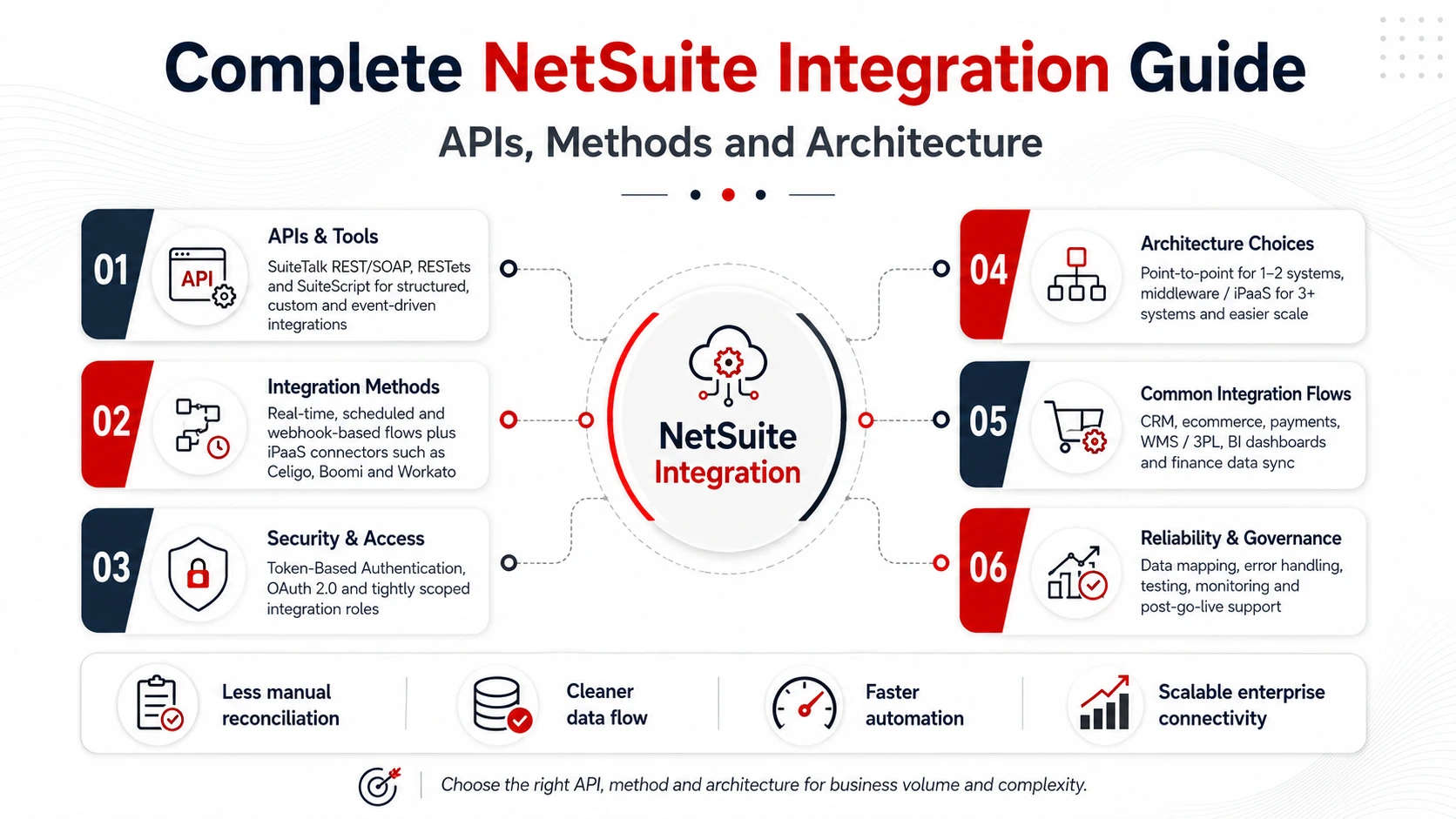
NetSuite Integration Methods and APIs
NetSuite offers several ways to connect external systems and choosing the right one depends on data volume, timing needs and how much custom logic the integration requires.
SuiteTalk (SOAP & REST)
SuiteTalk is NetSuite's native web services API, available in both SOAP and REST flavours and it remains the most common entry point for structured record-level operations such as creating invoices, updating customer records or syncing sales orders. The REST variant is generally preferred for new builds because it is lighter-weight and easier to work with from modern middleware and custom applications, while the SOAP API is still common in older, established integrations that haven't been re-platformed.
RESTlets
RESTlets are custom, lightweight endpoints built using SuiteScript and they exist specifically for scenarios where SuiteTalk's standard record operations aren't flexible enough. A RESTlet can encapsulate custom business logic - validation rules, multi-record transactions or calculations specific to your business - behind a single, purpose-built API call, which often performs better than chaining several generic SuiteTalk requests together.
SuiteScript
SuiteScript is NetSuite's server-side scripting language, used to trigger logic during record events such as a sale being created or a shipment being confirmed. It's rarely the entire integration on its own, but it is frequently the glue that makes an integration behave correctly - enforcing data rules, triggering downstream actions or transforming data before it's written to a connected system.
Webhooks and Saved Searches
For near-real-time notifications without constant polling, many integrations combine NetSuite's saved search functionality with scheduled scripts or external webhook services, so a connected system is notified of changes shortly after they happen rather than checking in on a fixed schedule.
iPaaS Connectors (Celigo, Boomi, Workato and similar platforms)
Rather than building every connection from scratch, many businesses route their NetSuite integration through an integration platform as a service. These platforms provide pre-built NetSuite connectors, visual workflow builders and built-in error handling, which significantly reduces the custom development required - particularly useful when a business needs to connect NetSuite to five, ten or more external systems.
Most enterprise-grade NetSuite ERP integration projects combine two or more of these methods depending on whether a given flow is real-time, scheduled or event-driven and depending on how much custom logic sits between the two systems.
Authentication and Security for NetSuite Integrations
Every NetSuite integration needs a secure, properly scoped way to authenticate. NetSuite supports Token-Based Authentication (TBA), which issues long-lived tokens scoped to specific roles and permissions without requiring a user's actual login credentials to be stored anywhere - this is the recommended approach for most machine-to-machine integrations. NetSuite also supports OAuth 2.0 for newer integrations and for connecting to platforms that expect a standard OAuth flow, which is increasingly the default for SuiteTalk REST and RESTlet-based connections.
Beyond the authentication method itself, security-conscious NetSuite integration services also scope access tightly - creating integration-specific roles with only the record types and permissions a given connection actually needs, rather than reusing a broad administrator role. This limits the blast radius if credentials are ever compromised and makes it far easier to audit exactly what an integration can and cannot touch.
Integration Architecture: Point-to-Point vs Middleware
A point-to-point NetSuite integration connects two systems directly and works well for simple, low-volume use cases - for example, a single e-commerce storefront pushing orders into NetSuite. It's fast to build and easy to reason about when there are only one or two connections in play.
As the number of connected systems grows, though, a middleware or iPaaS layer becomes the more resilient architecture. Instead of maintaining a dozen fragile direct connections, all point-to-point and each with its own authentication, error handling and data mapping logic, a middleware layer centralises these concerns in one place. When NetSuite's data model changes or a connected system updates its API, there's a single integration layer to update rather than a web of independent connections.
|
Factor |
Point-to-Point |
Middleware / iPaaS |
|
Best for |
1–2 connected systems |
3+ connected systems |
|
Build speed |
Faster initially |
Slower to set up, faster to extend |
|
Error handling |
Handled per-connection |
Centralised, consistent |
|
Maintenance |
Grows complex fast |
Easier to manage at scale |
|
Visibility |
Limited, per-integration logs |
Centralised monitoring and logs |
|
Long-term cost |
Rises sharply with more systems |
More predictable as systems are added |
This is the architecture most NetSuite integration services recommend once a business is connecting more than two or three external systems to NetSuite.
Common NetSuite Integration Use Cases
Most NetSuite integration projects fall into a handful of recurring categories:
- CRM integration – syncing leads, opportunities and customer records between a CRM like Salesforce or HubSpot and NetSuite so sales and finance see the same customer data.
- E-commerce integration – pushing orders, inventory levels and pricing between a storefront (Shopify, Magento or a custom platform) and NetSuite in near real time.
- Payment gateway integration – reconciling payment processor settlements and transaction fees automatically against NetSuite's accounting records.
- EDI integration – exchanging purchase orders, invoices and shipping notices with trading partners in standardised electronic formats.
- Warehouse and 3PL integration – synchronising inventory counts, shipment status and fulfilment data between NetSuite and third-party logistics providers.
Each of these use cases has different volume and latency requirements, which is exactly why the method and architecture chosen for one integration often differs from the next, even within the same NetSuite deployment. A CRM sync, for instance, can usually tolerate a short delay between a record updating in one system and reflecting in the other, while an e-commerce order flow generally needs to be near-instant to avoid overselling inventory that's already been promised to a customer elsewhere.
What Influences NetSuite Integration Cost
Pricing for a NetSuite integration project varies widely and three factors tend to move the estimate more than anything else. The first is the number of systems being connected - a single storefront-to-NetSuite sync is a fundamentally smaller project than tying together a CRM, payment gateway and 3PL provider at once. The second is data complexity: integrations moving simple, flat records (a contact, a single line-item order) are far cheaper to build than ones handling multi-level transactions, custom fields or historical data migration. The third is the volume and frequency of data - a nightly batch sync is considerably simpler to build and maintain than a real-time, high-volume flow that needs to handle spikes without dropping records.
Businesses evaluating quotes from different NetSuite integration services should ask for a breakdown by discovery, API/connector development, testing and post-go-live monitoring, rather than accepting a single lump-sum number. This makes it far easier to see where one proposal has under-scoped error handling or testing to appear more competitive on price and to compare like-for-like against a NetSuite integration partner that has priced the project properly from the start.
Common Mistakes to Avoid in NetSuite Integration Projects
Even experienced teams run into avoidable problems. The most frequent mistakes include treating integration as an afterthought rather than planning it alongside the initial NetSuite implementation, underestimating the effort required for error handling and retry logic and choosing a point-to-point approach for what will clearly become a multi-system environment within a year or two. Businesses also frequently skip documenting data mapping decisions, which makes future troubleshooting far harder than it needs to be once the person who built the integration has moved on. Planning for monitoring and alerting from day one - rather than discovering a broken sync days later - is one of the simplest ways to avoid costly data discrepancies.
Another common pitfall is failing to test edge cases before go-live: partial refunds, cancelled orders, currency conversions and records with missing optional fields all behave differently than the clean "happy path" data used during development and a surprising number of production incidents trace back to exactly these scenarios never being tested. It also helps to involve the teams who will actually use the connected systems - finance, warehouse and customer support staff often flag data mapping issues during a short review that a purely technical build would miss entirely.
Step-by-Step: How a NetSuite Integration Project Typically Works
Most NetSuite integration partners follow a broadly similar delivery process, even though the specific tools and timelines vary by project:
- Discovery & Requirements Mapping – identifying the systems to be connected, the data objects involved and the required volume and latency for each flow.
- API & Architecture Selection – choosing between SuiteTalk, RESTlets or an iPaaS connector based on the discovery findings.
- Authentication & Security Setup – configuring Token-Based Authentication or OAuth 2.0 with tightly scoped, integration-specific roles.
- Data Mapping & Build – mapping fields between systems and building the connectors, scripts or middleware workflows.
- Testing – validating the happy path alongside edge cases such as refunds, cancellations and currency conversions.
- Go-Live & Monitoring – deploying the integration with logging and alerting in place from day one.
- Post-Go-Live Support – ongoing monitoring, maintenance and adjustments as connected systems or data volumes change.
Businesses offering full-scope NetSuite ERP services typically fold this process into a larger implementation or optimisation engagement, rather than treating integration as a standalone, disconnected project.
What to Look for in a NetSuite Integration Partner
Not every NetSuite integration partner scopes projects the same way. Before signing an agreement, look for a partner who documents data flows and mapping decisions before writing any code, plans explicitly for error handling and retries rather than assuming the happy path and offers ongoing monitoring and support rather than a one-time handover. It's also worth asking how the partner handles authentication and role scoping, since a partner defaulting to broad administrator access for every integration is a sign of shortcuts elsewhere in the build. When comparing multiple NetSuite integration partners side by side, ask each for a sample data-mapping document - the quality of that one artefact usually says more about how the engagement will run than the pitch itself.
Why LinkedERP Is India's Trusted NetSuite Integration Partner
LinkedERP delivers NetSuite integration services for Indian and global businesses running NetSuite alongside CRMs, e-commerce platforms, payment systems and logistics partners, with deep platform expertise and a contractual commitment that defines what a professional NetSuite ERP integration should look like.
What LinkedERP Brings to Every Engagement
- Certified NetSuite Consultants – every integration is scoped and delivered by consultants with hands-on SuiteTalk, RESTlet and SuiteScript experience, named in the proposal before signing and retained through go-live.
- Architecture-First Design – before any code is written, LinkedERP documents data flows, authentication scope and error-handling logic, so the integration is built to survive real production volume, not just a demo.
- Fixed-Fee Proposals – full scope, documented deliverables, no surprise invoices - ever.
- Client-Owned Configuration – all integration logic, mappings and documentation transfer to you on completion - no dependency, no lock-in.
- Post-Implementation Managed Services – a named support contact, defined SLAs and proactive monitoring so integrations keep working as data volumes and connected systems grow.
LinkedERP's NetSuite Integration Capability Stack
- API Development – SuiteTalk (SOAP & REST) implementations, custom RESTlets and SuiteScript logic tailored to your business rules.
- Middleware & iPaaS – Celigo, Boomi and Workato-based architectures for businesses connecting multiple systems to NetSuite.
- CRM & Sales Integration – bi-directional sync between NetSuite and leading CRM platforms for unified customer and revenue data.
- E-commerce & Payments – order, inventory and settlement synchronisation between storefronts, payment gateways and NetSuite.
- EDI & Logistics – purchase order, invoice and shipment data exchange with trading partners and 3PL providers.
- Authentication & Security – Token-Based Authentication and OAuth 2.0 setups with tightly scoped integration roles.
- Monitoring & Support – centralised error logging, alerting and ongoing managed support after go-live.
Taken together, this is what separates LinkedERP from a typical integration vendor: certified consultants who document before they build, an architecture-first approach that anticipates growth rather than reacting to it and a capability stack broad enough that one NetSuite integration partner can carry you from the first connector through years of ongoing support.
Conclusion: So, What Should Your NetSuite Integration Strategy Look Like?
A successful NetSuite integration depends less on which API you use and more on how deliberately the architecture is planned. Whether you need a single connector between NetSuite and a storefront or a full middleware layer tying together your CRM, payment gateway and logistics partners, working with an experienced NetSuite integration partner ensures the system scales with your business rather than against it.
Book your NetSuite integration assessment with LinkedERP today
Talk to LinkedERP's team for a clear, architecture-first assessment tailored to your systems, data volume and growth plans.
www.linkederp.com | info@linkederp.com | Book a Free Integration Assessment
Frequently asked questions
NetSuite integration connects NetSuite with other business systems - such as CRMs, e-commerce platforms, or payment gateways - so data flows automatically without manual entry.
NetSuite supports SuiteTalk (SOAP and REST), RESTlets and SuiteScript, each suited to different data volume and timing requirements, along with iPaaS connectors for multi-system environments.
Key NetSuite benefits include eliminating duplicate data entry, real-time visibility across systems and more accurate financial and inventory reporting.
Point-to-point works for simple, low-volume needs but middleware or iPaaS is generally recommended once three or more systems need to connect to NetSuite.
Look for a partner offering structured discovery, clear architecture planning, tightly scoped authentication and ongoing monitoring - not just a one-time build.
Yes, LinkedERP provides end-to-end NetSuite ERP services, from integration architecture and API development to authentication setup and post-implementation support.