
Quick Summary:
|
Introduction: What Accounting Challenges Does NetSuite Actually Solve?
NetSuite for accounting solves the problems that come from running finance across spreadsheets and disconnected tools: slow closes, manual entry, multi-entity consolidation, currency handling, revenue recognition, tax compliance and weak audit trails. It does this by putting the general ledger, payables, receivables, revenue, tax and reporting in one cloud system.
NetSuite accounting software is not a cure for every finance problem. It works best when the process is mapped first and the system is configured around it.
This guide covers:
- The 10 most common accounting challenges
- How NetSuite addresses each one, with specific features
- How accounting firms use NetSuite
- How to choose a NetSuite service provider, solution provider or consultant
|
Market Context: Month-end close is the clearest measure of accounting efficiency. APQC's benchmarking of about 2,300 organizations puts the median monthly close at 6.4 calendar days, with the top quartile finishing in 4.8 days or fewer and the bottom quartile taking 10 days or more. Ventana Research and ISG found that 72% of teams that automate most of their reconciliations close within six business days, compared with 25% of teams that reconcile manually. The gap points to process and system choices, not team effort, as the main driver of close speed. Source: BPR Global, Automating Your Month-End Close (summarizing APQC and Ventana / ISG research) |
What Are the Top 10 Accounting Challenges and How Does NetSuite Solve Them?
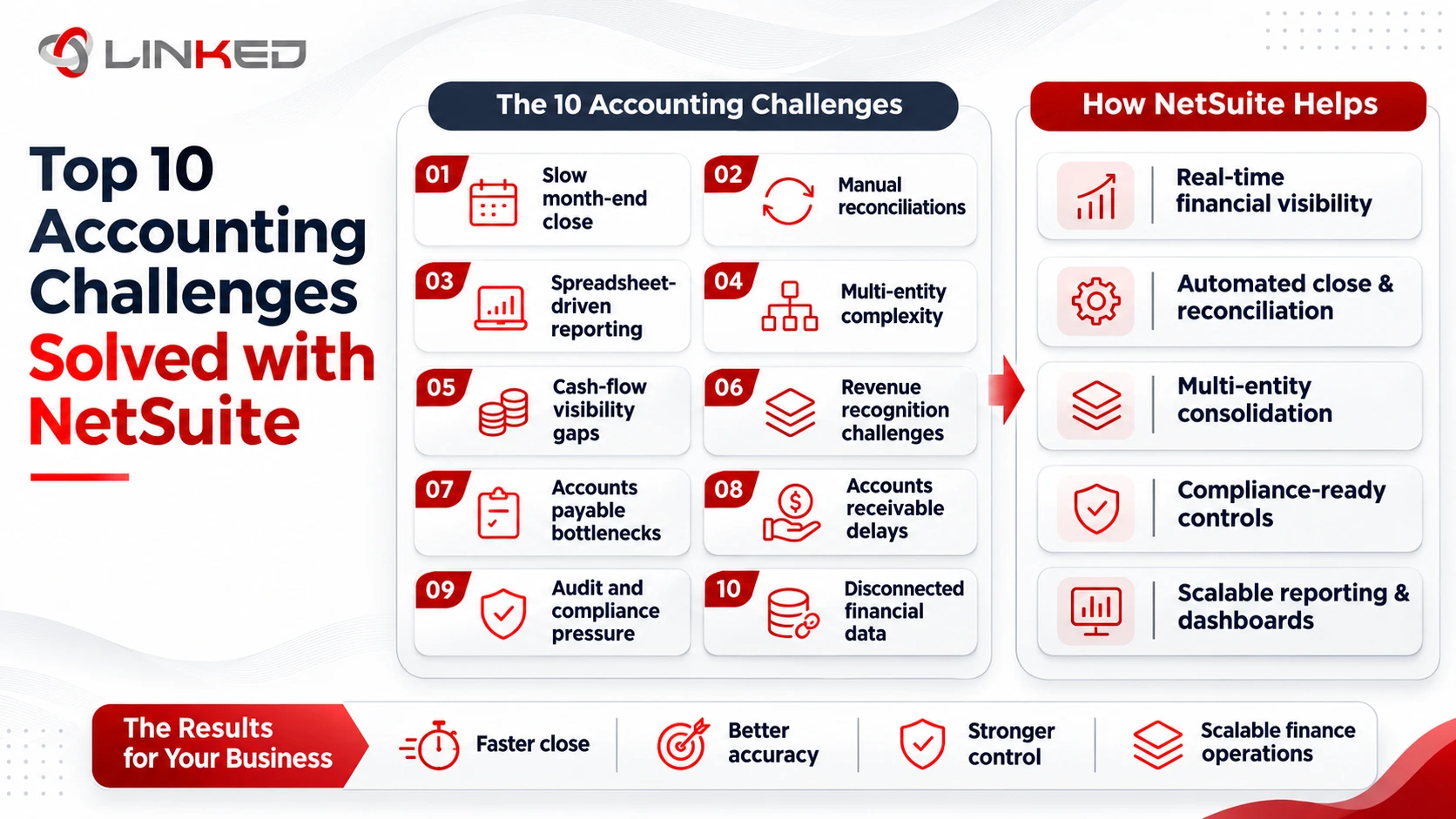
1. How Does NetSuite Speed Up the Month-End Close?
- The challenge: Reconciliations, journals and status tracking spread across spreadsheets stretch the close well beyond the benchmark median.
- Key benefit: One live ledger and a task checklist show what is still open, instead of teams chasing files.
Key features:
- Period close checklist: Close tasks are assigned and tracked inside NetSuite.
- Recurring and allocation journals: Routine entries post on schedule.
- Real-time statements: Balances reflect posted transactions without a batch refresh.
2. How Does NetSuite Reduce Manual Entry in Accounts Payable?
- The challenge: Vendor bills are keyed by hand and mismatches with purchase orders surface late.
- Key benefit: Bill data is captured and matched before it reaches the ledger.
Key features:
- Bill Capture: Extracts vendor bill data from uploaded documents.
- Approval workflows: Route bills by amount, department or vendor.
- Three-way matching: Compares the purchase order, receipt and bill.
3. How Does NetSuite Handle Multi-Entity Consolidation?
- The challenge: Each entity keeps separate books, intercompany transactions are eliminated by hand and subsidiaries may close on different fiscal years.
- Key benefit: NetSuite OneWorld consolidates subsidiaries in one system and each can keep its own fiscal calendar.
Key features:
- Multiple calendars: An OneWorld feature that supports different fiscal years per subsidiary.
- Elimination subsidiaries: Intercompany balances are removed from consolidated figures.
- Consolidated exchange rates: Subsidiary results translate into the parent's currency.
4. How Does NetSuite Manage Multi-Currency Accounting?
- The challenge: Foreign balances are translated by hand and rate errors flow into reports.
- Key benefit: Transactions post in both local and base currency at the correct rate, with support for 190 currencies.
Key features:
- Automatic conversion: Rates apply as transactions are entered.
- Period-end revaluation: Open foreign currency balances are revalued and the adjustment is posted.
- Consolidated reporting: Group results appear in the parent currency.
5. How Does NetSuite Simplify Revenue Recognition?
- The challenge: Contracts with multiple elements, usage and renewals push recognition schedules into spreadsheets.
- Key benefit: Recognition schedules are generated from contracts under ASC 606 and IFRS 15 using Advanced Revenue Management.
Key features:
- SuiteBilling: Manages recurring subscriptions, proration, consolidated charges and renewal invoices.
- Revenue Management link: Billing feeds recognition without re-keying.
- Schedule trail: Each recognition entry traces back to its contract.
6. How Does NetSuite Support GST, TDS and E-Invoicing in India?
- The challenge: GST rates, TDS on vendor bills, e-invoices and e-way bills are handled outside the ledger, which invites errors at filing time.
- Key benefit: The India Localization SuiteTax Engine SuiteApp calculates GST and TDS and sends e-invoices through a GST Suvidha Provider to the Invoice Registration Portal.
Key features:
- GST calculation: Applied on sales and purchase transactions.
- E-invoicing: Connects to GSPs, with ClearTax preconfigured, to generate and certify e-invoices.
- E-way bills: Generated from the Invoice Reference Number for goods movement above the INR 50,000 threshold.
- TDS: Calculated on vendor bill transactions.
- Setup note: Oracle's documentation says SuiteTax must be enabled and the SuiteApp set up through your NetSuite account manager.
7. How Does NetSuite Automate Bank and Intercompany Reconciliation?
- The challenge: Teams match bank lines and intercompany balances manually, which consumes hours every period.
- Key benefit: Matching rules and mirrored entries reduce manual tick-and-flick work.
Key features:
- Bank matching: Imported bank data is matched to ledger transactions by rule.
- Intercompany entries: A transaction in one subsidiary creates the counterpart entry in the other.
- Reconciliation reports: Unmatched items stay visible until cleared.
8. How Does NetSuite Replace Spreadsheet Reporting?
- The challenge: Reports are rebuilt manually each month and different versions disagree.
- Key benefit: Dashboards and reports read directly from live transactions.
Key features:
- Role-based dashboards: KPI scorecards and views for each role.
- SuiteAnalytics Workbook: Pivot tables and charts without IT support.
- Saved searches: Real-time, filtered lists that also feed custom KPIs.
9. How Does NetSuite Strengthen Audit Trails and Internal Controls?
- The challenge: Manual journals and spreadsheet edits leave weak records of who changed what and who approved it.
- Key benefit: Changes and approvals are recorded inside the system.
Key features:
- System notes: Record changes with the user and time.
- Role-based permissions: Limit who can post, approve and edit.
- Approval workflows: Apply sign-off to journals, bills and purchase orders.
10. How Does NetSuite Scale Without Adding Accounting Headcount?
- The challenge: Growth adds entities, currencies and tools faster than the team can grow.
- Key benefit: Subsidiaries, modules and users are added on the same platform instead of new systems.
Key features:
- OneWorld subsidiaries: New entities join the existing structure.
- Integration options: SuiteTalk, RESTlets and connectors link CRM, e-commerce and banking.
- Vendor-managed releases: Oracle delivers updates twice a year.
Which Accounting Challenges Should You Fix First?
Not every challenge need fixing at once. Rank them by cost and risk, then phase the work.
- Compliance Risk First. If GST, TDS or e-invoicing errors are possible, fix them before anything else.
- Close Speed Second. A slow close delays every decision, so it is usually the next priority.
- Consolidation and Currency Next. Multi-entity groups should settle intercompany and rate handling early.
- Revenue Recognition for Contract-Heavy Businesses. Move it up the list if contracts have several elements.
- Reporting Last but Plan It Early. Dashboards depend on clean data, so design them while configuring the ledger.
NetSuite accounting software supports a phased approach. Start with the core ledger and add modules as processes stabilize.
How Does NetSuite for Accounting Compare with Spreadsheets and Basic Tools?
|
Challenge |
Spreadsheets and Basic Tools |
NetSuite for Accounting |
|
Month-end close |
Manual tracking and file chasing |
Close checklist on a live ledger |
|
Accounts payable |
Hand-keyed bills |
Captured, matched and routed for approval |
|
Consolidation |
Manual eliminations per entity |
Elimination subsidiaries and consolidated rates |
|
Multi-currency |
Manual rate lookups |
Automatic conversion and revaluation |
|
Revenue recognition |
Schedules in spreadsheets |
Generated from contracts |
|
India compliance |
GST, TDS and e-invoices outside the ledger |
GST, TDS and e-invoicing in the transaction flow |
|
Reconciliation |
Manual matching |
Rule-based bank matching and mirrored intercompany entries |
|
Reporting |
Rebuilt monthly |
Role-based dashboards and saved searches |
|
Audit trail |
Weak change records |
System notes and approval workflows |
How Do Accounting Firms Use NetSuite for Accounting?
NetSuite for accounting firms comes up in two ways. A firm can run its own practice on it or it can advise clients who are adopting it.
To run the firm:
- Project accounting: NetSuite describes SuiteProjects Pro as a professional services tool covering planning, staffing, billing and reporting.
- Multi-office structures: OneWorld handles multiple subsidiaries and currencies.
- Time to invoice: Time and expense data can feed billing rules.
To advise clients:
- Platform recommendation: Firms point clients outgrowing basic tools toward NetSuite accounting software.
- Process and controls: The firm advises on close, approvals and reporting design.
- Delivery: Implementation usually goes to a NetSuite solution provider or one of the NetSuite consulting partners.
How Do You Choose a NetSuite Service Provider, Solution Provider or Consultant?
These terms overlap but they describe different things.
- NetSuite solution provider: According to NetSuite, Solution Providers sell NetSuite licenses, implement the system and support it afterwards.
- NetSuite consulting partners: NetSuite describes its Alliance Partners as focused on consulting, integration and implementation services.
- NetSuite service provider: A broad term for any firm delivering NetSuite work, so always confirm its partner designation.
- NetSuite consultant: An individual specialist, often certified through Oracle's program.
When comparing a NetSuite service provider, ask:
- Accounting experience: Which finance processes have they configured, such as close, consolidation or revenue recognition?
- Firm experience: For NetSuite for accounting firms, have they set up time, billing and project accounting for a professional services practice?
- Named consultants: Who will do the work and which certifications do they hold?
- India compliance: Can they show GST, TDS and e-invoicing configured?
- References: Can you speak to a client of similar size?
- Support terms: What happens after go-live and in writing?
What Does a NetSuite Accounting Rollout Typically Include?
A structured rollout lowers risk. Each step builds on the one before.
- Discovery - Document current close, approval, consolidation and compliance processes.
- Design - Decide the chart of accounts, subsidiary structure, roles and approval rules.
- Configuration - Set up the ledger, subsidiaries, tax, workflows and reports.
- Data Migration - Cleanse and load balances, vendors, customers and open items.
- Testing - Run realistic scenarios, including refunds, adjustments and intercompany entries.
- Training - Teach each role what it will actually do in the system.
- Go-Live and Support - Cut over, monitor closely and fix issues quickly.
What Should You Ask a NetSuite Consultant in Discovery?
Discovery is where a NetSuite consultant shows how they think. These questions reveal it.
- How would you map our current close? A good answer starts with your process, not their template.
- Which of our challenges needs process change, not configuration? Honest answers build trust.
- How will you handle our entity and currency structure? Ask for specifics on subsidiaries and rates.
- What will you document and hand over? Mapping, roles and configuration should be yours.
- Who supports us after go-live? Get names and response times.
What Mistakes Do Finance Teams Make When Adopting NetSuite?
- Skipping Process Mapping - The system then copies spreadsheet habits instead of fixing them.
- Over-Customizing - Heavy custom work adds testing and upkeep with every release.
- Underestimating Data Cleanup - Messy charts of accounts and vendor records carry into the new system.
- Ignoring Controls - Roles and approvals are set up last or not at all.
- Neglecting Training - Teams drift back to spreadsheets when each role is not trained on the new process.
- Choosing on Price Alone - The cheapest quote often leaves out testing, training or support.
- Treating Go-Live as the End - Early issues appear after launch, so support terms matter.
How LinkedERP Approaches NetSuite for Accounting
LinkedERP is one of the NetSuite consulting partners accounting teams can consider and it scopes projects around the challenges in this guide.
- Process First - Close, consolidation and approval flows are documented before configuration begins.
- India Compliance - GST, TDS and e-invoicing are configured from day one.
- Named Consultants - Each NetSuite consultant is named in the proposal before signing.
- Documented Scope - Modules, deliverables and exclusions are agreed upfront.
- Defined Support - A named contact and response times are set before go-live.
Conclusion: Is NetSuite for Accounting Right for Your Finance Team?
The 10 challenges in this guide share one root cause: finance work spread across disconnected files and tools. NetSuite for accounting brings the ledger, payables, revenue, tax and reporting into one system, which addresses each challenge at its source.
The result still depends on setup. Map the process, configure it deliberately and choose the right NetSuite solution provider or NetSuite service provider. A careful NetSuite consultant will tell you which of these challenges NetSuite solves for you and which need process change first.
Before you start, confirm four things:
- Your Top Three Challenges - Rank them by cost and risk.
- Your Entity and Currency Structure - List subsidiaries, currencies and fiscal years.
- Your Compliance Needs - Note GST, TDS and e-invoicing requirements.
- Your Owner - Name one person who can approve process decisions quickly.
Ready
to fix your accounting bottlenecks?
Talk to LinkedERP's team for a scoped assessment of your close, compliance and reporting needs.
www.linkederp.com | info@linkederp.com | Book a Free Assessment
Frequently asked questions
Look for partners with proven experience in financial close, consolidation, revenue recognition, GST, TDS and reporting. LinkedERP is one option for Indian businesses seeking NetSuite finance implementation and ongoing support.
Compare certified consultants, finance-process experience, India compliance expertise, implementation methodology, references and written post-go-live support rather than choosing on price alone.
Yes. An experienced partner can configure close checklists, recurring journals, intercompany eliminations, multi-currency consolidation and real-time reporting to reduce spreadsheet-driven finance work.
Choose a provider that can demonstrate GST, TDS, e-invoicing and e-way bill configuration in live Indian implementations, not simply list localization as a capability.
Ask how they will map your close process, handle entities and currencies, configure controls, migrate financial data and support the system after go-live.
Yes. NetSuite OneWorld supports multiple subsidiaries, currencies and consolidation while allowing finance teams to manage tax, reporting and controls from one cloud platform.