
Quick Summary:
|
Introduction: What Is ERP Software for the Manufacturing Industry?
ERP software for the manufacturing industry is a single system that connects the main parts of a factory business: planning, inventory, production, purchasing, quality, sales and finance. Instead of each team keeping its own spreadsheet, everyone works from the same live data.
ERP stands for enterprise resource planning. In manufacturing, the "resources" are materials, machines, people and money.
This ERP software manufacturing industry guide is written for first-time buyers. It covers:
- What ERP software does on a factory floor and in the back office
- The core modules to look for in ERP software for manufacturing
- How production type changes your needs
- What to check when choosing among ERP software providers in India
- A simple rollout plan
|
Market Context: Manufacturing is one of the largest parts of India's economy, which is why the systems behind it matter. According to the India Brand Equity Foundation (IBEF), manufacturing contributes around 16-17% of India's GDP and employs more than 27 million workers and India is targeting a 25% share of GDP in the coming years through programmes such as Make in India and Production Linked Incentive schemes. IBEF also reports that micro, small and medium enterprises account for about 35.4% of manufacturing output. That means many manufacturers adopting ERP are smaller firms that need practical, affordable systems rather than enterprise-scale complexity. Source: IBEF, Manufacturing Sector in India; IBEF, Manufacturing Industry Presentation |
What Does ERP Software for Manufacturing Actually Do?
ERP software gives a manufacturer one place to plan, run and measure the business. It replaces scattered tools with shared records.
- Plans Production - It turns customer orders and forecasts into production schedules and material needs.
- Tracks Inventory - It shows raw materials, work in progress and finished goods in real time.
- Controls Purchasing - It raises purchase requests when stock runs low or production needs materials.
- Records Quality - It captures inspections, defects and rework against each batch or order.
- Calculates Cost - It links material, labour and overhead to each product.
- Reports Results - It gives management live views of output, margin and delivery.
Most plants start without it. They run on spreadsheets, paper job cards and separate accounting software.
How Do You Know It's Time to Move from Spreadsheets to ERP Software?
Most plants outgrow spreadsheets gradually. These signs usually show up first.
- Stock Counts Disagree - The warehouse, purchasing and finance each report a different number.
- Late Orders Are Routine - Teams discover material shortages after production has started.
- Costing Is Guesswork - Nobody can say what a product really costs to make.
- Reports Take Days - Management waits for manual compilation at month-end.
- Compliance Is Manual - GST and e-way bill data is re-keyed between files.
- Growth Adds Chaos - New products, plants or customers multiply the spreadsheets.
Two or three of these together are a strong signal to evaluate ERP software.
How Is Manufacturing ERP Different from Basic Accounting Software?
Accounting software records money. ERP software also runs the operations that create it.
|
Capability |
Basic Accounting Software |
ERP Software for Manufacturing |
|
Invoicing and ledgers |
Yes |
Yes |
|
Bills of materials |
No |
Yes |
|
Production orders |
No |
Yes |
|
Material planning |
No |
Yes |
|
Inventory by location |
Limited |
Yes |
|
Quality records |
No |
Yes |
|
Shared data across teams |
Limited |
Yes |
Many plants start with accounting software and add ERP when operations become the bottleneck.
What Are the Core Modules of ERP Software for Manufacturing?
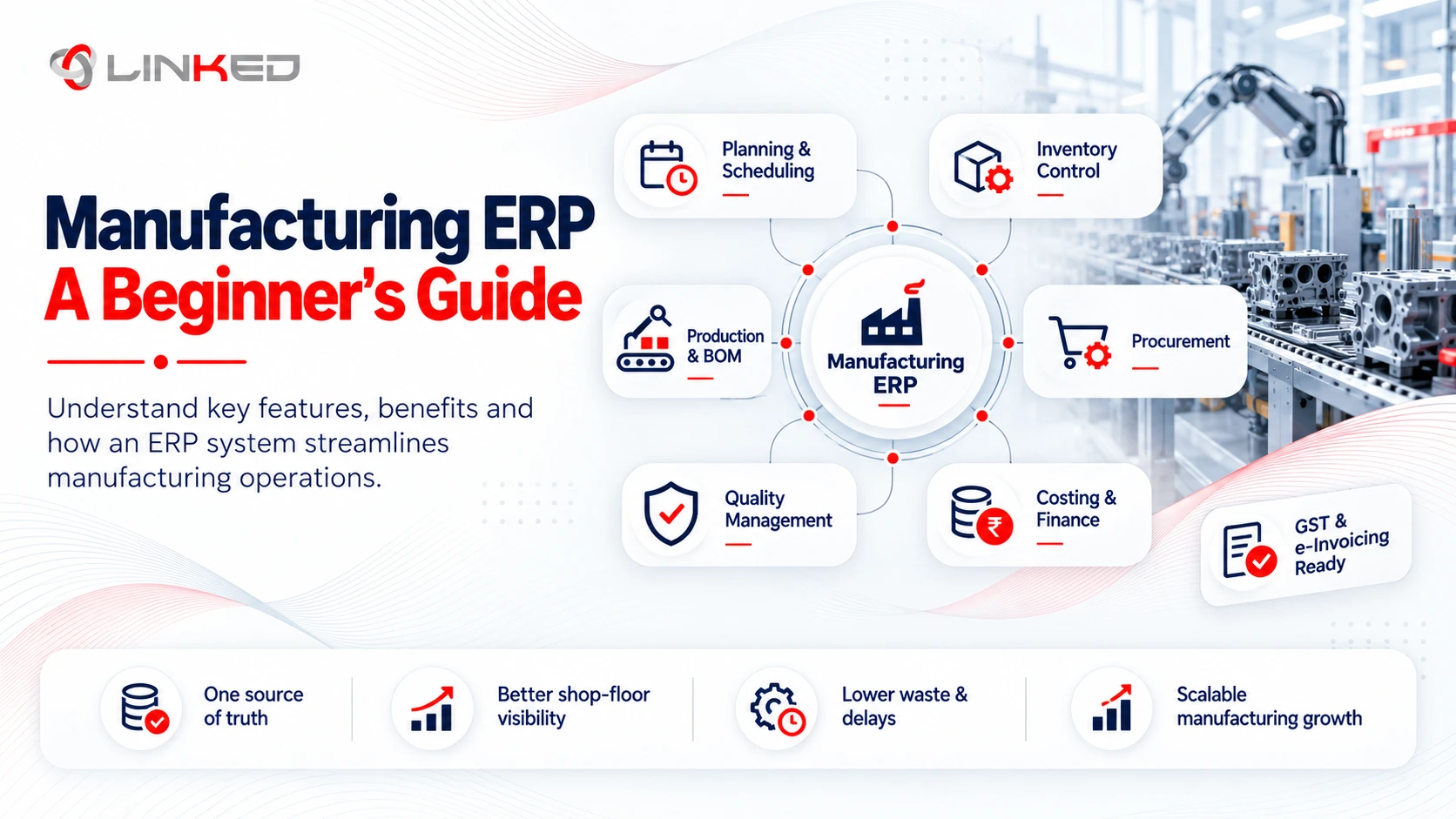
1. Bill of Materials and Production
This is the heart of manufacturing ERP software.
- What it does - Defines what goes into each product and manages production orders.
- Why it matters - Accurate bills of materials drive material planning and cost.
- Look for - Multi-level bills of materials, work orders and routings.
2. Inventory and Warehouse Management
Inventory shows what you have and where it is.
- What it does - Tracks stock across locations, with every movement recorded.
- Why it matters - Wrong stock figures cause line stoppages and excess purchasing.
- Look for - Lot or serial tracking, reorder rules and barcode support.
3. Procurement
Procurement manages what you buy.
- What it does - Handles requests, purchase orders and supplier records.
- Why it matters - Late or wrong materials delay production.
- Look for - Supplier performance tracking and links to inventory and production plans.
4. Production Planning and MRP
Material requirements planning works out what to make and buy and when.
- What it does - Calculates material needs from orders, stock and lead times.
- Why it matters - It reduces both shortages and overstock.
- Look for - Finite or capacity-aware scheduling and clear exception alerts.
5. Quality Management
Quality records show whether output meets the standard.
- What it does - Records inspections, non-conformances and corrective actions.
- Why it matters - Traceability protects customers and supports audits.
- Look for - Batch traceability and quality checks built into production steps.
6. Finance and Costing
Finance turns production activity into numbers.
- What it does - Posts costs, calculates product margins and produces statements.
- Why it matters - Without accurate costing, pricing decisions are guesses.
- Look for - Work-in-progress accounting and variance reporting.
At a Glance: The 6 Core Modules Compared
|
Module |
Main Question It Answers |
Typical Owner |
|
Bill of Materials and Production |
What do we make and how? |
Production |
|
Inventory and Warehouse |
What do we have and where? |
Stores and operations |
|
Procurement |
What do we need to buy? |
Purchasing |
|
Production Planning and MRP |
What to make and buy and when? |
Planning |
|
Quality Management |
Does output meet the standard? |
Quality |
|
Finance and Costing |
What does it cost and earn? |
Finance |
What Are the Benefits of ERP Software in the Manufacturing Industry?
The benefits come from shared, live data. Each one removes a manual step.
- Fewer Stock-Outs - Planning and inventory work from the same figures.
- Less Excess Inventory - Purchasing follows real demand instead of guesswork.
- Better On-Time Delivery - Production schedules reflect real material and capacity.
- Clearer Product Costs - Material, labour and overhead are linked to each product.
- Easier Audits - Records, approvals and traceability are stored in one place.
- Faster Reporting - Management sees output and margin without waiting for month-end.
Results depend on setup quality and data accuracy, not just the software.
How Does Manufacturing ERP Differ by Production Type?
Different plants use ERP differently. Choose a system that fits how you actually make things.
|
Production Type |
What It Looks Like |
ERP Strength to Prioritise |
|
Discrete |
Assembled products, such as machinery or electronics |
Multi-level bills of materials and routings |
|
Process |
Formulas and batches, such as chemicals or food |
Recipes, batch tracking and yield |
|
Make-to-order |
Built to a customer's specification |
Quoting, job costing and project tracking |
|
Make-to-stock |
Built for inventory in anticipation of demand |
Demand planning and inventory optimisation |
|
Mixed-mode |
A combination of the above |
Flexible planning and configurable workflows |
Ask any provider to show a working example of your production type.
Why Does ERP Software in India Need Local Compliance Features?
ERP software in India has to handle tax and reporting rules that many global products were not built for.
- GST - Correct CGST, SGST and IGST calculation on every transaction.
- E-Invoicing - Integration with the government's invoice registration portal where required.
- E-Way Bills - Generation and tracking for goods movement.
- TDS and TCS - Deduction and collection handled in the accounting workflow.
- Return Preparation - Data ready for periodic GST filings.
Compliance mistakes tend to appear at filing time, which is the most expensive moment to fix them. Ask each provider how many India-compliant go-lives they have delivered.
How Do You Choose Among ERP Software Providers in India?
The market has many ERP software providers in India, from large global vendors to local specialists. Compare them with the same checklist.
- Manufacturing Experience - Ask for clients in your sector and production type.
- India Compliance - Ask to see GST and e-invoicing configured, not described.
- Implementation Method - Ask for a project plan showing discovery, testing and training.
- Named Team - Confirm who will work on your project.
- Integration Skills - Check experience connecting machines, e-commerce and banking.
- Support Terms - Get response times and upgrade handling in writing.
- Pricing Clarity - Ask for a phase-by-phase quote with exclusions listed.
Which ERP Options Do Manufacturers Commonly Consider?
Two platforms often appear on manufacturers' shortlists: NetSuite and Odoo. They suit different situations.
|
Factor |
NetSuite |
Odoo |
|
Model |
Cloud ERP on a subscription |
Modular apps, with an open-source Community edition and a subscription-based Enterprise edition |
|
Typical fit |
Growing mid-market firms, multi-entity groups |
Small and mid-sized firms that want to add apps over time |
|
Manufacturing features |
Bills of materials, work orders, WIP and routings |
Bills of materials, manufacturing orders and work-order planning |
|
Customisation |
Scripting and workflow tools |
Low-code Studio on Enterprise, plus code-level changes |
|
Best question to ask |
How many entities and users will we have? |
Which edition includes the apps we need? |
Neither is better in every case. Fit depends on size, complexity and budget.
What Should a Manufacturing ERP Budget Include?
Licence or subscription cost is only one line. Plan for the full list.
- Software Subscription or Licences - Priced by users, modules or both, depending on the product.
- Implementation - Discovery, configuration, testing and go-live support.
- Data Migration - Cleaning and loading items, bills of materials, suppliers and balances.
- Integration - Connections to machines, banks, e-commerce or other systems.
- Training - Role-based sessions for operators, planners and finance staff.
- Support and Upgrades - Ongoing help and testing when the vendor releases updates.
Ask each provider for a quote that lists every line, so you can compare like for like.
What Questions Should You Ask in an ERP Demo?
A demo shows the product at its best. Use questions to see how it handles your reality.
- Can you demo my production type? - Ask for a scenario that matches how you make things.
- How does it handle scrap and rework? - Real plants have both.
- Can you show GST and e-invoicing configured? - Ask for a live example.
- How are bills of materials revised? - Check version control and approvals.
- What does a month-end close look like? - Ask to see costing and reporting.
- Who supports us after go-live? - Get names and response times.
What Mistakes Do First-Time Buyers Make?
A few mistakes appear repeatedly.
- Buying on Price Alone - The cheapest quote often leaves out testing, training or support.
- Skipping Process Mapping - The system then copies bad habits instead of fixing them.
- Underestimating Data Cleanup - Messy bills of materials and item masters break planning.
- Over-Customising Early - Try standard workflows first.
- Ignoring Training - Shop-floor adoption decides whether data is accurate.
- Forgetting Support - Problems appear in the weeks after go-live.
How Should You Roll Out Manufacturing ERP Step by Step?
A phased rollout lowers risk. Each step builds on the one before.
- Step 1: Map Processes - Document how orders, materials and production flow today.
- Step 2: Clean Data - Fix item masters, bills of materials and supplier records.
- Step 3: Configure the Core - Set up inventory, purchasing, production and finance first.
- Step 4: Test With Real Scenarios - Include rework, scrap and partial deliveries.
- Step 5: Train by Role - Teach operators, planners and finance staff separately.
- Step 6: Go Live and Support - Cut over, monitor closely and fix issues quickly.
- Step 7: Add Advanced Features - Bring in quality, analytics and integrations later.
What Should You Expect in the First Year After Go-Live?
Set realistic expectations. Gains build over time as data quality improves.
- First Weeks - Expect questions, corrections and some manual workarounds while teams adapt.
- First Quarter - Stock accuracy and reporting speed usually become noticeable improvements.
- Mid-Year - Planning rules can be tuned using real consumption and lead-time data.
- End of Year - Costing and margin analysis are reliable enough to inform pricing.
Agree measures in advance, such as stock accuracy, on-time delivery and days to close the month.
How LinkedERP Approaches ERP for Manufacturers
LinkedERP is one of the ERP software providers in India you may compare. It implements NetSuite and Odoo for manufacturers and scopes projects around the steps in this guide.
- Process Mapping First - Scope is documented before configuration begins.
- India Compliance - GST, e-invoicing and TDS/TCS are configured from day one.
- Data Cleanup - Bills of materials and item masters are validated before go-live.
- Named Team and Fixed Scope - Consultants are named and deliverables agreed upfront.
- Defined Support - A named contact and response times are set before signing.
Conclusion: Is ERP Software Right for Your Manufacturing Business?
ERP software helps manufacturers replace scattered spreadsheets with one connected system for planning, production, inventory, purchasing, quality and finance. For most growing plants, the question is not whether to adopt it, but which system fits and how to roll it out well.
Use this ERP software manufacturing industry guide as a starting checklist. Map your processes, clean your data and compare providers on method, compliance depth and support. A careful approach to ERP software for manufacturing prevents most of the problems first-time buyers face.
Exploring
ERP software for your plant?
Talk to LinkedERP's team for a scoped assessment of your processes, compliance needs and the right system for your business.
www.linkederp.com | info@linkederp.com | Book a Free Assessment
Frequently asked questions
Look for partners with proven experience in manufacturing workflows such as production planning, inventory, procurement, costing and shop-floor operations. LinkedERP is one option for mid-market manufacturers seeking NetSuite implementation and support in India.
Prioritise manufacturing experience, certified consultants, India compliance knowledge, integration capability and a clear implementation methodology with post-go-live support.
Yes. NetSuite can connect finance, inventory, procurement, production, order management and reporting in one cloud ERP, helping manufacturers scale without relying on disconnected systems.
The strongest providers are those that understand manufacturing processes, can configure industry-specific workflows and offer ongoing support after go-live rather than only software implementation.
Yes, where requirements are clearly defined and standard workflows fit the business. A phased implementation using proven templates and limited customisation can help shorten deployment time.
ERP software gives manufacturers better control over inventory, production planning, procurement, costing, order fulfilment and financial reporting while reducing manual data entry and process gaps.