
Quick Summary:
|
Introduction: What Are Odoo ERP Modules and What Does Each One Do?
Odoo ERP modules are individual business apps, such as Sales, Inventory, Accounting and Manufacturing, that you install separately and that share one database when used together. Each module handles one business function. Together, they form a single Odoo ERP system without the usual patchwork of disconnected tools.
That modular design is Odoo's biggest strength. You can start with two or three apps and add more as the business grows.
It also creates a real planning question: which modules do you actually need and in what order?
This guide covers:
The Odoo ERP modules list, with 12 core modules at a glance
What each module does, with key features and how it connects to others
How Odoo ERP integration works between modules and with outside systems
Which modules to install first, based on your business type
Market Context: Odoo describes itself as a suite of open-source business apps covering CRM, eCommerce, accounting, inventory, point of sale, project management and more. Its own repository notes that the apps can be used as stand-alone applications, but integrate seamlessly to form a full ERP when several are installed. Odoo's website groups its apps into categories such as sales, website, inventory and manufacturing, HR, marketing and services, which is why module choice and rollout order matter as much as the platform itself. Odoo's licensing documentation also separates the open-source Community edition from the subscription-based Enterprise edition, so confirm which edition includes each module you plan to use. Source: Odoo, GitHub repository; Odoo 19.0 Documentation, Licenses |
What Is the Odoo ERP Modules List? The 12 Core Modules at a Glance
This table gives a quick view of the 12 core modules before the detail below.
# | Module | What It Does | Typically Used By |
|---|---|---|---|
1 | Sales | Quotes orders, pricing and invoicing triggers | Sales teams |
2 | CRM | Leads, pipeline and opportunity tracking | Sales and marketing |
3 | Inventory | Stock, warehouses and movements | Warehouse and operations |
4 | Manufacturing | Bills of materials and production orders | Production teams |
5 | Purchase | Requests for quotation and purchase orders | Procurement |
6 | Accounting | Financial and analytic accounting, invoicing | Finance teams |
7 | Project | Tasks, stages and project tracking | Delivery teams |
8 | Employees (HR) | Employee records, leave, recruitment, payroll | HR teams |
9 | Point of Sale | Retail and restaurant checkout | Shops and outlets |
10 | Website and eCommerce | Website builder and online store | Marketing and e-commerce |
11 | Marketing | Email, SMS and automation campaigns | Marketing teams |
12 | Dashboard | KPI views and spreadsheet-based reporting | Management |
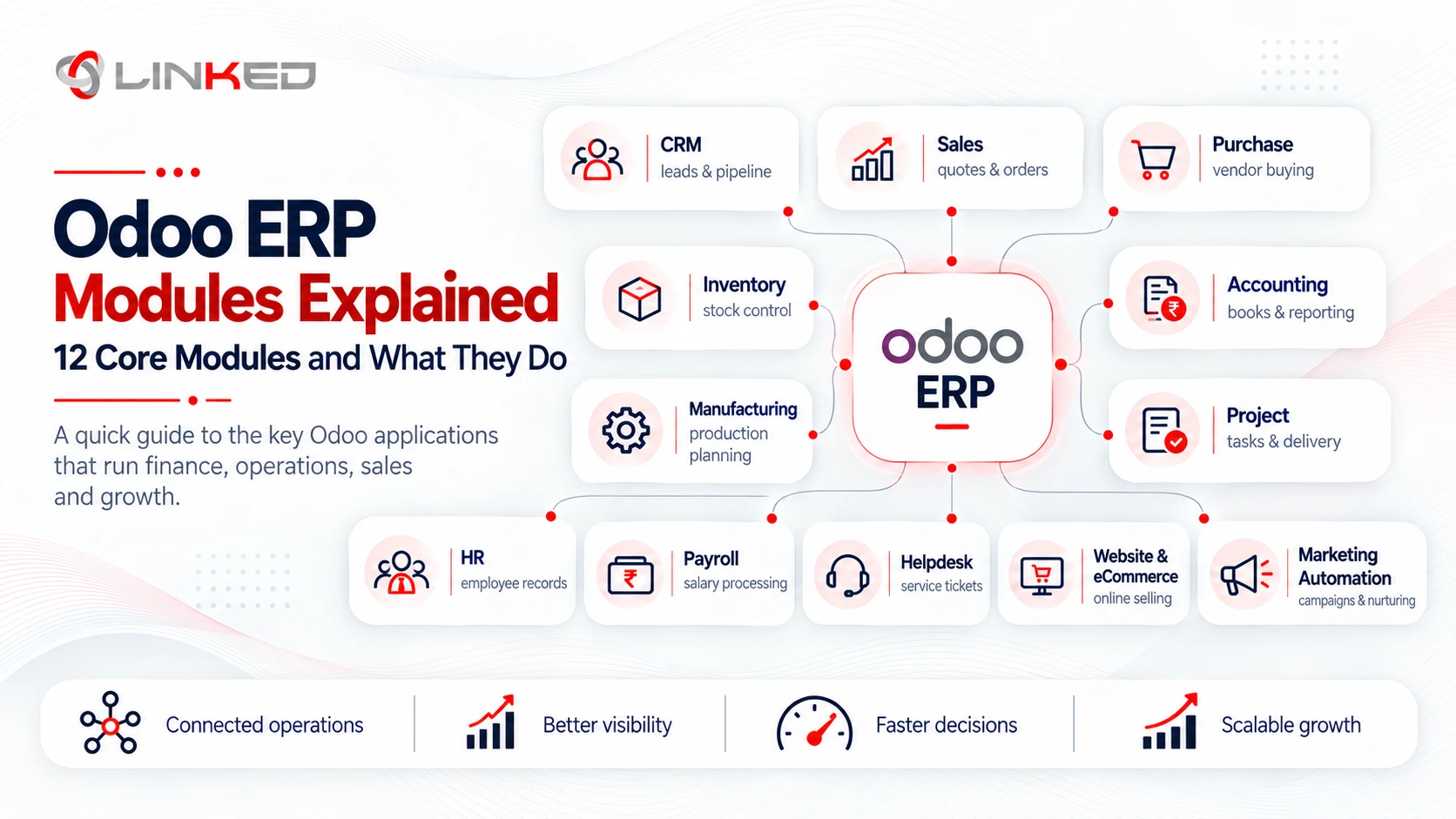
What Are the 12 Core Odoo ERP Modules and What Does Each One Do?
1. Sales
The Sales module turns customer interest into confirmed orders.
What it does - Creates quotations, converts them to sales orders and manages pricing and discounts.
Key features - Quotation to order flow, pricelists and delivery and invoicing triggers.
Connects with - Inventory for delivery, Accounting for invoices and CRM for opportunities.
2. CRM
CRM tracks prospects before they become orders.
What it does - Manages leads and opportunities through a visual pipeline.
Key features - Pipeline stages, scheduled activities and lead tracking.
Connects with - Sales, where a won opportunity becomes a quotation.
3. Inventory
Inventory shows what you hold, where it is and what is moving.
What it does - Tracks stock across locations and records every movement.
Key features - Warehouse management, stock moves, reordering rules and lot or serial tracking.
Connects with - Sales, Purchase, Manufacturing and Accounting for stock valuation.
4. Manufacturing
Manufacturing plans and records production.
What it does - Manages bills of materials and manufacturing orders.
Key features - Component lists, production orders and work-order planning.
Connects with - Inventory for components and finished goods and Purchase for materials.
5. Purchase
Purchase manages what you buy from suppliers.
What it does - Handles requests for quotation, purchase orders and vendor records.
Key features - Purchase orders, tenders and agreements.
Connects with - Inventory for receipts and Accounting for vendor bills.
6. Accounting
Accounting is the financial core of the system.
What it does - Manages financial and analytic accounting, invoicing and reconciliation.
Key features - Customer and vendor invoicing, taxes, bank reconciliation and country localisation, including India.
Connects with - Nearly every other module, since sales, purchases and stock all create accounting entries.
7. Project
Project organises delivery work.
What it does - Tracks tasks, stages and progress for internal and client projects.
Key features - Task boards, stages and linked timesheets for billable work.
Connects with - Sales for project-based orders and Accounting for invoicing from time spent.
8. Employees (HR)
The HR apps manage your people.
What it does - Keeps employee records and supports HR processes.
Key features - Employee records, Time Off, Recruitment, Appraisals and Payroll.
Connects with - Project and Timesheets for time and Accounting for payroll postings.
9. Point of Sale
Point of Sale handles in-person selling.
What it does - Provides a checkout interface for shops and restaurants.
Key features - Retail and restaurant ordering, payments and session handling.
Connects with - Inventory for stock updates and Accounting for sales entries.
10. Website and eCommerce
These apps put your business online.
What it does - Builds a website and runs an online store.
Key features - Website builder, product catalogue and online ordering.
Connects with - Inventory for availability, Sales for orders and Accounting for invoices.
11. Marketing
Marketing apps reach customers at scale.
What it does - Runs campaigns across channels.
Key features - Email Marketing, SMS Marketing, Marketing Automation and Surveys.
Connects with - CRM and Sales to link campaigns to leads and revenue.
12. Dashboard
The Odoo dashboard gives management a live view of the numbers.
What it does - Presents key metrics in one place, using spreadsheet-based dashboards.
Key features - KPI views, filters and reporting that pull from other apps.
Connects with - All other modules, since it reports on their data.
Most individual apps also include their own reporting views, so a dashboard adds a cross-module view on top.
How Do Odoo ERP Modules Work Together?
Modules share one database. That is what makes Odoo ERP integration between apps native rather than custom.
A typical order flows through several modules without re-keying:
CRM - A lead becomes an opportunity.
Sales - A won opportunity becomes a quotation, then a sales order.
Inventory - The confirmed order triggers a delivery.
Accounting - The delivery and order generate the invoice and entries.
Purchasing and production work the same way:
Purchase to Inventory - Received goods update stock.
Inventory to Accounting - Stock movements feed valuation and vendor bills.
Manufacturing to Inventory - Components are consumed and finished goods are added.
What About Odoo ERP Integration with Outside Systems?
Native integration only covers Odoo's own apps. Other tools need separate Odoo ERP integration.
Typical Connections - Payment gateways, banks, e-commerce platforms, logistics tools and CRMs.
API Options - Odoo's documentation describes an external JSON-2 API for connecting other systems.
Scope It Early - Decide which system owns customer, product and pricing data before building.
Treat outside integrations as a separate workstream with its own testing.
What Odoo ERP System Features Apply Across All Modules?
Some capabilities sit across the whole Odoo ERP system, not inside one app.
One Database - Every module reads and writes the same records.
Modular Rollout - You can add apps over time without replacing the system.
Reporting Views - Apps include reporting and dashboards bring them together.
Customisation - Studio offers low-code changes and developers can extend modules with code.
Multi-Company Support - A single system can serve more than one legal entity.
Localisation - Country packages cover local tax and reporting needs.
Availability of some features differs between Community and Enterprise, so confirm each one against your edition.
What Should an Odoo Dashboard Show for Each Team?
An Odoo dashboard is only useful if it answers questions each team actually asks. Plan it by role, not by module.
Sales - Pipeline value, quotes awaiting approval and orders confirmed this period.
Inventory and Operations - Stock levels against reorder points, pending deliveries and late receipts.
Finance - Outstanding customer invoices, vendor bills due and cash position.
Projects - Tasks by stage, hours logged against budget and overdue work.
Management - A short set of headline numbers pulled from every module.
Keep each dashboard to a handful of metrics. A crowded screen gets ignored.
How Do Edition Differences Affect Odoo ERP Modules?
Odoo comes in two editions. According to Odoo's licensing documentation, Community is open source, while Enterprise is proprietary and tied to a paid subscription.
Check Each Module - Some apps and Odoo ERP system features exist in only one edition.
Check Add-Ons - Studio and some reporting tools may depend on your plan.
Plan for Growth - Moving from Community to Enterprise later is documented, but plan it rather than assuming it.
Get It in Writing - Ask your partner to list which edition and plan covers every module in the quote.
What Should You Ask Before Finalising Your Module List?
A short checklist helps before you commit to a module list.
Which Process Hurts Most? - Start with the module that fixes it.
Who Owns Each Module? - Name one business owner per app.
What Data Moves In? - List what must be migrated for each module.
Which Outside Systems Connect? - Note every tool that needs Odoo ERP integration.
What Is the Rollout Order? - Agree phases and what "done" means for each.
Who Supports It Afterwards? - Confirm support terms before signing.
Which Odoo ERP Modules Should You Install First?
Start with the modules that address your biggest process pain, then add others.
Business Type | Suggested Starter Modules |
|---|---|
Trading and distribution | Sales, Inventory, Purchase, Accounting |
Manufacturing | Sales, Inventory, Manufacturing, Purchase, Accounting |
Services and consulting | CRM, Sales, Project, Accounting |
Retail | Point of Sale, Inventory, Accounting |
Online seller | Website and eCommerce, Inventory, Sales, Accounting |
A phased approach usually works best:
Phase 1 - Core transaction modules, usually Sales, Purchase, Inventory and Accounting.
Phase 2 - Function-specific modules such as Manufacturing or Project.
Phase 3 - Growth modules such as Marketing, Website and the Odoo dashboard.
What Do Odoo ERP Services Typically Include?
Odoo ERP services cover more than installing modules.
Discovery - Mapping your processes and deciding which modules fit.
Configuration - Setting up modules, workflows and roles.
Data Migration - Cleansing and loading existing data.
Customisation - Adapting modules only where standard workflows fall short.
Integration - Connecting Odoo to outside systems.
Training and Support - Preparing users and supporting the system after go-live.
Ask any provider which of these are included in their quote.
How Do You Know an Odoo Module Is Working?
Set a simple measure for each module before go-live. That turns "installed" into "delivering".
Sales - Time from quote to confirmed order.
Inventory - Stock count accuracy and the number of stock-outs.
Purchase - Time from request to purchase order.
Accounting - Days to close the month and invoice accuracy.
Project - Share of tasks delivered on time.
HR - Time spent on leave and attendance admin.
Review these figures after the first quarter and adjust the setup where a module is not moving its number.
What Mistakes Should You Avoid When Choosing Odoo ERP Modules?
A few mistakes appear repeatedly.
Installing Everything at Once - More apps mean more configuration, testing and training.
Ignoring Edition Differences - A module you planned around may not be in your edition.
Customising Too Early - Try standard workflows before building custom ones.
Skipping Data Cleanup - Dirty data undermines every module.
No Owner Per Module - Each module needs a business owner who signs off on its setup.
How LinkedERP Approaches Odoo ERP Modules
LinkedERP is one of the Odoo ERP services providers you may compare and it plans module rollouts around the guidance in this guide.
Module Scoping - Which Odoo ERP modules you need is documented before configuration begins.
Phased Rollout - Core apps go first, with other modules added as processes stabilize.
Standard-First Configuration - Odoo's built-in workflows are used wherever they fit.
India Compliance - GST, TDS and e-invoicing are configured alongside accounting.
Named Team and Support - Consultants are named before signing, with defined post-go-live support.
Conclusion: Which Odoo ERP Modules Does Your Business Actually Need?
Odoo ERP modules work best when you choose them deliberately. The 12 core modules in this guide cover sales, operations, finance, people and reporting, but no business needs all of them at once.
Start with the Odoo ERP modules list entries that match your biggest process pain. Confirm the edition, plan integrations separately and roll out in phases. That approach keeps the Odoo ERP system manageable while it grows with the business.
Not
sure which Odoo ERP modules to start with?
Talk to LinkedERP's team for a scoped assessment of your processes, module needs and rollout order.
www.linkederp.com | info@linkederp.com | Book a Free Assessment
Frequently asked questions
Odoo offers dozens of business apps covering finance, CRM, sales, inventory, manufacturing, HR, projects, ecommerce, marketing and more, with additional community and third-party modules available.
Core Odoo modules commonly include Accounting, CRM, Sales, Purchase, Inventory, Manufacturing, Project, HR, Helpdesk, Website and Ecommerce, depending on the business use case.
Odoo Community provides the open-source core, while Enterprise adds extra apps and advanced capabilities such as Studio, additional reporting, support and enhanced business features.
Start by mapping your critical processes, pain points, compliance needs and growth plans, then select only the modules required for phase one and add others as the business evolves.
Yes. Odoo modules can be configured and extended through Studio, custom development and third-party apps, but customisation should be limited to areas where standard workflows cannot meet the business requirement.