
Quick Summary:
|
Introduction: What Is Odoo ERP Customization and When Is It Worth Doing?
Odoo ERP customization is any change that makes Odoo behave differently from its standard setup. It ranges from simple settings and no-code Studio changes to custom modules written in code. It is worth doing when a process is unique to your business and standard Odoo or a maintained app, cannot cover it.
Every customization has a long-term cost. It must be tested and maintained through each Odoo version upgrade.
This guide covers:
- What can be customized, from lightest to heaviest
- What Odoo ERP customization costs, with sourced rate ranges
- When to customize and when to leave standard Odoo alone
- How to choose Odoo ERP customization services and a partner
|
Market Context: Odoo's own documentation shows how customization is layered. Studio is a no-code toolbox for fields, views, models, automation rules, webhooks, PDF reports, approval rules and security rules and installing it on the Standard pricing plan triggers an upsell to the Custom plan. Odoo defines a custom module as any module that extends the standard code and was not built with Studio. Its upgrade documentation adds that a database with custom modules cannot be upgraded until those modules are available for the target version and that if a new version breaks a customization, fixing it is the responsibility of the module's maintainer. Source: Odoo 19.0 Documentation, Studio |
What Can Be Customized in Odoo ERP?
There are four levels. Each adds flexibility and each adds upkeep.
1. What Is Standard Configuration in Odoo?
- What it is: Settings, options and workflows that ship with each app.
- Best for: Needs that standard features already cover.
- Skills needed: Functional Odoo knowledge, no coding.
- Upgrade impact: Lowest, since you stay on standard behavior.
2. What Can You Change with Odoo Studio?
- What it is: A no-code toolbox built into Odoo.
- What it covers: Fields, views, models, automation rules, webhooks, PDF reports, approval rules and security rules.
- Best for: Extra fields, adjusted screens, approval chains and printed documents.
- Plan note: Odoo's documentation says installing Studio on the Standard plan triggers an upsell to the Custom plan.
- Upgrade impact: Low to moderate but every Studio change is still a customization that needs testing.
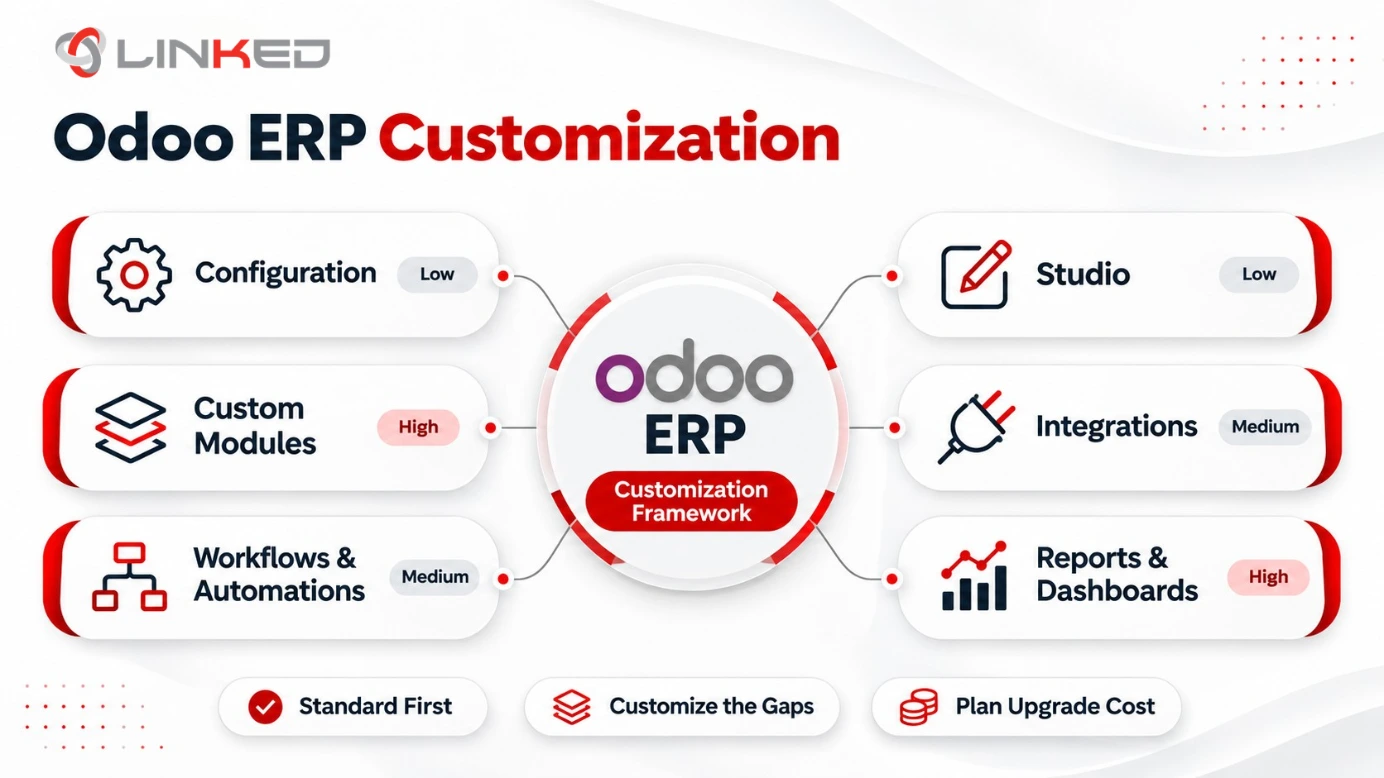
3. What Are Custom Modules in Odoo?
- What it is: Code that extends the standard Odoo code, written by a developer.
- Best for: Complex logic, unusual workflows and features Studio cannot build.
- Skills needed: Odoo framework development, typically Python and XML.
- Upgrade impact: Highest. Each custom module must be updated for every new Odoo version.
4. How Are Integrations Customized in Odoo?
- What it is: Connections between Odoo and outside systems.
- Typical targets: Payment gateways, banks, e-commerce platforms, logistics tools and CRMs.
- Methods: Odoo's external API and webhooks.
- Upgrade impact: Moderate, since APIs and connected tools change over time.
At a Glance: The Four Levels Compared
|
Level |
Skills |
Main Cost Driver |
Upgrade Impact |
|
Configuration |
Functional Odoo knowledge |
Consultant time |
Lowest |
|
Studio |
Functional knowledge, light technical |
Plan cost and consultant time |
Low to moderate |
|
Custom modules |
Developer skills |
Development hours |
Highest |
|
Integrations |
Developer skills |
Scope and testing |
Moderate |
Which Odoo ERP Customizations Are Most Common?
Most requests fall into a handful of patterns. Knowing them helps you judge which level you need.
- Extra Fields - Product, customer or order fields that capture data standard screens do not hold. Usually Studio.
- Approval Chains - Sign-off rules on purchases, discounts or expenses. Usually Studio.
- Printed Documents - Custom quotation, invoice or delivery note layouts. Studio PDF reports cover many cases.
- Automation Rules - Triggers that assign tasks, send alerts or update records when conditions are met.
- Custom Reports - Management views that standard reporting does not offer.
- Integrations. Links to payment gateways, banks, courier tools or e-commerce platforms. Usually developer work.
- Industry Logic - Pricing, scheduling or compliance rules specific to your sector. Often a custom module.
What Does Odoo ERP Customization Cost?
Odoo does not publish customization prices, so cost depends on level, scope and who builds it. These marketplace ranges give a starting point.
Hourly rates:
- Freelance Odoo developers: Upwork says rates run from $10 to $100 an hour, depending on experience, location and complexity.
- Odoo freelancers in India: Upwork's India page shows example profile rates of $10 to $35 an hour.
- Software firms in India: Clutch reports typical rates of $25 to $49 an hour.
Project ranges on Upwork:
- Basic configuration: $300 to $1,200 per project.
- Custom module development: $1,500 to $5,000 per project.
- Multi-app integration: $4,000 to $12,000 per project.
What these figures leave out:
- Agencies: An Odoo development company usually charges more than a freelancer, because the rate covers project management and testing.
- Testing: Realistic scenario testing takes hours beyond the build.
- Documentation: Handover notes cost time but protect you later.
- Upgrades: Each custom module needs work for every new version.
- Plan cost for Studio: The Custom plan costs more per user than Standard, so check Odoo's pricing page.
A simple estimate: hours times rate, plus testing, plus yearly maintenance. Ask every Odoo ERP customization company for all three.
When Should You Customize Odoo ERP and When Should You Not?
Customize when:
- The Process Is a Differentiator - It is how you win customers and standard Odoo would flatten it.
- A Rule Is Mandatory - A legal or contractual requirement is not covered by standard features.
- The Workaround Costs More - Manual steps cost more each year than the build and upkeep.
- An Integration Is Essential - A system you rely on must connect to Odoo.
Do not customize when:
- Standard or Studio Works - A setting or a no-code change solves it.
- It Is Only Habit - The process exists because "we've always done it this way."
- No Upgrade Plan Exists - Nobody owns testing and maintenance.
- A Maintained App Exists - Check available apps before building from scratch.
A quick test before any request:
- Why is it needed?
- Can standard Odoo or Studio do it?
- Who maintains it through upgrades?
- What does it cost over three years?
- What happens if we skip it?
How Does Customization Affect Odoo ERP Upgrades?
Customization and upgrades are linked and the link drives long-term cost.
- Compatibility First - A database with custom modules cannot be upgraded until those modules are available for the target version.
- Breakage Is the Maintainer's Job - If a new version breaks a customization, its maintainer must fix it.
- Test Before You Move - Odoo's guide recommends testing custom modules in an empty database first, then on an upgraded copy.
- Fewer Customizations, Fewer Surprises - Each extra module adds testing at every upgrade.
- Plan the Budget - Include upgrade effort in the yearly cost of every custom module.
How Should Odoo ERP India Customization Be Handled?
Indian businesses should customize carefully around compliance. Odoo ERP India setups already have official localization.
- Use the Localization First - Odoo's India modules cover GST and e-invoicing and e-way bills have been available since Odoo 15.
- Customize Only the Gaps - Rebuilding what the localization provides adds cost and risk.
- Test Against a Real Filing Cycle - Compliance errors tend to surface at filing time.
- Document Every Change - GST rules change and undocumented customizations are hard to adjust.
- Keep Integrations Tidy - E-invoicing depends on a GST Suvidha Provider connection, so test it after any change.
How Do You Scope an Odoo Customization Request?
A clear request saves hours of build and rework. Write each one down before anyone starts.
- The Problem - Describe what goes wrong today, in plain language.
- The Goal - State the result you want, such as fewer manual steps or a required report.
- The Users - Name who will use it and how often.
- The Data - List which fields, records and apps are involved.
- The Owner - Name one person who approves the design and signs off the result.
- The Alternative - Note what standard Odoo, Studio or a maintained app could do instead.
An Odoo ERP consultant can review these notes and tell you which level of customization fits each request.
What Does a Customization Project Look Like Step by Step?
A structured project keeps cost under control. Each step feeds the next.
- Step 1: Requirement Review - Confirm the problem and test whether standard options solve it.
- Step 2: Design - Agree fields, screens, rules and access rights in writing.
- Step 3: Build - Configure in Studio or write the module.
- Step 4: Testing - Run realistic scenarios, including edge cases and permissions.
- Step 5: Documentation - Record what was built, why and how to change it.
- Step 6: Go-Live and Review - Release, watch early use and fix issues quickly.
How Do You Choose an Odoo ERP Customization Company?
Three kinds of firms often overlap. Know which one you need.
- Odoo ERP consultant: Advises on fit, scope and whether customization is needed at all.
- Odoo development company: Writes the custom code and integrations.
- Odoo ERP implementation company: Delivers the whole project, from discovery to go-live and may offer Odoo ERP customization services as part of it.
Questions to ask any provider:
- Do you recommend standard first? - A good partner pushes back on unnecessary custom work.
- Who maintains the code? - Get upgrade responsibilities in writing.
- What is documented and handed over? - You should own the documentation.
- Can I speak to a reference? - Ask for a client with similar customizations.
- What testing do you do? - Look for scenario testing, not just a demo.
- What support follows go-live? - Ask for response times.
How Do You Test an Odoo Customization Before Release?
Testing catches problems while they are cheap to fix.
- Use a Copy - Test on a staging copy of your database, never directly in production.
- Test Real Scenarios - Use actual orders, invoices and edge cases, not only a clean demo record.
- Check Permissions - Confirm each role sees and edits only what it should.
- Test Reports and Automations - Verify printed documents, alerts and automated actions behave as designed.
- Retest After Upgrades - Odoo's guidance for customized databases is to test custom modules before the production upgrade.
How Do You Keep Odoo Customizations Maintainable?
Maintainability is a habit, not a feature. These practices keep future cost down.
- Name Things Clearly - Fields, rules and modules should explain themselves.
- Document the Why - Record the business reason, not only the technical change.
- Keep an Inventory - List every Studio change and custom module in one place.
- Assign an Owner - Each customization has one accountable person.
- Review Yearly - Retire customizations that no longer earn their upkeep.
- Choose a Stable Partner - A reliable Odoo development company will still be there at the next upgrade.
What Mistakes Make Odoo ERP Customization Expensive?
- Customizing Before Using Standard - Teams build what Odoo already does.
- Copying the Old System - Replicating legacy screens creates needless code.
- Skipping Documentation - Fixes become guesswork when developers change.
- Ignoring Upgrade Cost - The build is cheap compared with years of maintenance.
- No Owner - Nobody is accountable for each customization.
- Hiring on Rate Alone - The lowest hourly rate often means more hours and more rework.
How LinkedERP Approaches Odoo ERP Customization
LinkedERP is one of the Odoo ERP customization company options you may compare and it scopes work around the points in this guide.
- Standard First - Odoo's built-in workflows are used wherever they fit.
- Scoped Customization - Each custom item has a stated purpose, owner and cost.
- India Compliance - GST and e-invoicing use Odoo's localization, with custom work limited to real gaps.
- Documented Handover - Configuration and code notes transfer to you on completion.
- Defined Support - A named contact and upgrade handling are agreed before go-live.
Conclusion: How Much Odoo ERP Customization Does Your Business Actually Need?
Odoo ERP customization is a spectrum. Start with standard configuration, move to Studio when you need no-code changes and use custom modules only where nothing lighter will do. Each step up adds cost now and upkeep at every upgrade.
Before you commit, rank your requests by value, test them against standard Odoo and ask who will maintain them. A good Odoo ERP consultant will tell you which requests to build and which to drop and a careful Odoo ERP implementation company will plan the Odoo ERP implementation around that decision.
Before you request Odoo ERP customization services, confirm four things:
- Your Top Requests - Rank them by business value.
- Your Edition and Plan - Check which tools your plan includes, such as Studio.
- Your Maintainer - Name who will fix each customization after an upgrade.
- Your Three-Year Budget - Include build, testing and upkeep, not only the first invoice.
Deciding
what to customize in Odoo?
Talk to LinkedERP's team for a scoped assessment of your requirements, costs and upgrade plan.
www.linkederp.com | info@linkederp.com | Book a Free Assessment
Frequently asked questions
Customize the dashboard around each role by showing only the KPIs, tasks, alerts and reports users need most, using Odoo Studio, filters, views and tailored reporting.
Odoo customization can align workflows, fields, approvals and reports with your actual processes, helping reduce manual work, improve usability and support better decision-making.
Customization becomes important when standard Odoo workflows do not fully match your operational, compliance or reporting needs and those gaps affect efficiency or control.
Yes. Odoo can be customized through configuration, Studio, custom modules, integrations and tailored reports, depending on how far your requirements differ from the standard system.
Customize only when a clear business requirement cannot be met efficiently through standard Odoo functionality; standard-first configuration usually keeps upgrades and maintenance simpler.