
Quick Summary:
|
Odoo API integration is easiest when you pick the right route for the job. Start with Odoo's own JSON-2 API and built-in integrations, then add an automation platform or connector where they fall short. This guide compares ten tools and connectors, explains how Odoo API authentication and API keys work and flags the plan limits that catch many teams out. |
Introduction: Which Tools Are Best for Odoo API Integration in 2026?
The best starting point for Odoo API integration in 2026 is Odoo's own External JSON-2 API, combined with Odoo's built-in integrations. Automation platforms such as Zapier, Make and n8n suit light workflows, while unified APIs, enterprise platforms and data connectors suit larger or more technical projects.
This is not a ranking. The ten options are chosen because Odoo support is documented and none paid to be included.
This guide covers:
- How the Odoo API, Odoo API authentication and the Odoo API key work
- Where to find the Odoo API integration documentation
- Ten tools and connectors, each with who it suits best
- Plan limits, selection criteria and common mistakes
|
Market Context: Odoo's integration layer is changing and the plan you are on matters. According to Odoo's 19.0 documentation, the External JSON-2 API is new in Odoo 19 and is reached by posting to a /Json/2/ endpoint with an API key as a bearer token. Access to data through the external API is only available on Custom pricing plans, not on One App Free or Standard. The older XML-RPC and JSON-RPC protocols are deprecated from Odoo 19, with removal scheduled for Odoo 22 in fall 2028. Source: Odoo 19.0 Documentation, External JSON-2 API |
What Is Odoo API Integration and How Does the Odoo API Work?
Odoo API integration means connecting Odoo to another system so data moves between them automatically. The Odoo API exposes Odoo's models, such as products, contacts and sales orders, over HTTP.
In Odoo 19 and later, the pattern is simple and consistent. Each request is a POST to /Json/2/ followed by the model and the method, with named arguments in a JSON body.
Key points to know:
- Named arguments only - The JSON-2 API has no positional arguments.
- Standard security - It uses Odoo's normal access rules, so an integration can do only what its user may do.
- One transaction per call - Each API call runs in its own database transaction.
- Dynamic documentation - Your own Odoo server provides live documentation at /doc.
How Does Odoo API Authentication Work?
Odoo API authentication in JSON-2 uses an API key sent as a bearer token. The key goes in the Authorization header and the login and password are not used at all.
When one Odoo server hosts several databases, you also send an X-Odoo-Database header with the database name. Depending on your deployment, the Host header can do the same job.
Older protocols work differently. XML-RPC and JSON-RPC pass the database, user and either a password or an API key with every call, which is one reason JSON-2 is simpler and safer.
For API integration in Odoo, this means three practical rules:
- Use JSON-2 for new builds - Do not start new work on deprecated protocols.
- Send the key only over HTTPS - Treat it like a password.
- Use a dedicated integration user - The key carries that user's access rights.
How Do You Create an Odoo API Key?
You create an Odoo API key from the user's own preferences: Preferences, then Account Security, then New API Key. Odoo asks for a description and a duration, then generates the key.
The key belongs to the user who creates it and inherits that user's access. Odoo's documentation says the JSON-2 API uses Odoo's standard security models, so a request made with the key can read or change only what that user is allowed to. That is why the user you choose matters as much as the key itself.
The steps are short:
- Open Preferences - Go to your user profile menu and choose Preferences.
- Choose Account Security - Select New API Key.
- Add a description and a duration - Odoo requires both, so name the key after the integration it serves.
- Generate the key - Odoo creates a strong 160-bit random key.
- Store it securely - Keep it in a secrets manager, not in code or a shared document.
Good habits keep the Odoo API key safe. Create a dedicated user for each integration, give it only the access it needs and set the shortest duration that works. Revoke the key when the integration is retired and replace it on a schedule.
A clear description also helps later. A key named after its job, such as "Zapier lead sync", makes audits easier, because the answer to "what is this key for?" is already on the record.
One last check: a key only helps if your plan allows external API access. On Odoo's hosting that means a Custom plan, as covered later in this guide.
Where Is the Odoo API Integration Documentation?
The Odoo API integration documentation lives on Odoo's own documentation site, with a second, live copy on your own server. Use the site to learn how the API works and your server to see what your database contains.
Three places cover everything:
- Odoo's External JSON-2 API page - The reference for endpoints, required headers, API keys and key management. Start here for authentication and the request format.
- Your own server's /doc page - Dynamic documentation for the models available in your database, which is the quickest way to confirm exact model and method names.
- The External RPC API page - Reference for legacy XML-RPC and JSON-RPC, useful if you maintain older integrations.
Odoo publishes its documentation by version, such as 19.0 and master and the pages change between versions. Check that the version selector matches your Odoo release before you copy any example.
A practical workflow is to read the JSON-2 page once for the pattern, then keep /doc open while you build, because it shows what your own system actually exposes.
What Are the 10 Best Odoo API Integration Tools and Connectors for 2026?
The 10 best Odoo API integration tools and connectors for 2026 are the Odoo JSON-2 API, Studio webhooks and automation rules, Odoo's native integrations, Zapier, Make, n8n, Apideck, Workato, CData connectors and Odoo Apps Store connectors. Each is described below with its strength and who it suits.
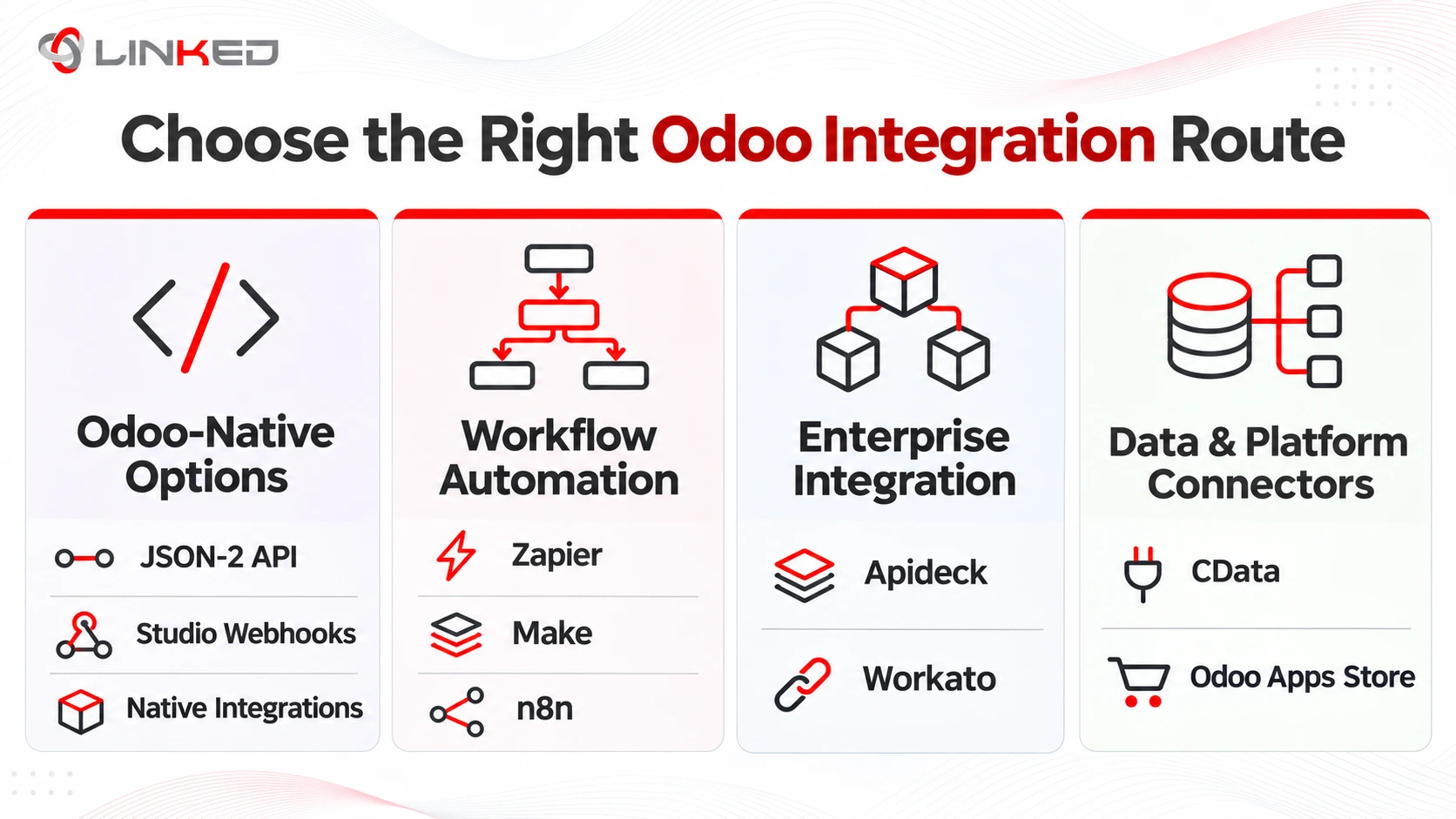
1. Odoo JSON-2 API: The Native Standard for New Integrations
The external API built into Odoo 19 and later, with one pattern: a POST to /Json/2/ with the model and method, named arguments in a JSON body and an API key as a bearer token. It follows Odoo's standard security rules and dynamic documentation is available on your own server. Ideal for custom builds and any new Odoo API integration on Odoo 19 or later.
2. Studio Webhooks and Automation Rules: Low-Code Outbound Triggers
Odoo Studio's toolbox includes automation rules and webhooks, so a change to a record in Odoo can trigger a call to another system without custom code. Studio belongs to Odoo's Enterprise offering and on Odoo's hosting it depends on the Custom plan. Ideal for pushing events out of Odoo, such as a confirmed order notifying a logistics tool.
3. Native Odoo Integrations: Check Here Before You Build
Odoo includes ready-made integrations with services such as Stripe, Amazon, UPS, Plaid and AvaTax and Odoo maintains them as the platform upgrades. Their scope is fixed and some need the Enterprise edition. Ideal for common needs where a built-in option already exists, so no API work is required.
4. Zapier: Quick No-Code Workflows
Zapier offers an Odoo CRM app that works with databases hosted at odoo.com, so a new Odoo lead can trigger actions in a large library of other apps. Task-based pricing and limited error handling make it better for light flows than heavy data sync. Ideal for small teams automating simple lead and notification flows.
5. Make: Visual Scenarios with Odoo Modules
Make provides an Odoo app with modules to create leads and inventory records and to make a generic API call and its Odoo documentation requires an API key on Odoo 14 and later. Ideal for teams that want visual, multi-step scenarios with more control than a basic trigger-and-action tool.
6. n8n: Self-Hostable Workflow Automation
n8n includes an Odoo node that covers contacts, opportunities and notes, with a custom resource option for other models and it can be self-hosted. Ideal for technical teams that want control over where workflows run and the option to add custom code steps.
7. Apideck: One Unified API Across Many Systems
Apideck's unified API includes an Odoo connector and official SDKs for Node.js, TypeScript, PHP, .NET, Python, Java and Go. Ideal for software vendors that need to connect to Odoo alongside many other business systems through a single integration.
8. Workato: Enterprise Automation with Odoo Data
Workato is an enterprise integration and automation platform built around recipe-based workflows and it can work with Odoo data through third-party connectors such as CData. Ideal for larger organisations that already run Workato and want Odoo inside governed enterprise workflows.
9. CData: Drivers and Connectors for Data Teams
CData provides drivers and connectors for Odoo data, with documented routes into Excel, Apache Airflow, Apache Camel, Apache NiFi and automation platforms. Ideal for data and analytics teams that want Odoo records in spreadsheets, pipelines or data warehouses.
10. Odoo Apps Store Connectors: Third-Party Modules for Specific Platforms
The Odoo Apps Store lists third-party connector modules for specific platforms, such as a Webflow e-commerce connector for Odoo 16 to 18. Odoo's documentation says Odoo Online is incompatible with custom and Apps Store modules, so these suit Odoo.sh or on-premise databases. Ideal for businesses on Odoo.sh or on-premise that want a pre-built connector for one specific platform.
Pabbly Connect and Albato are further no-code options that list Odoo support, if the platforms above do not fit.
At a Glance: The 10 Options Compared
|
# |
Tool |
Type |
Best For |
Note |
|
1 |
Odoo JSON-2 API |
Native API |
New custom integrations |
Odoo 19+; Custom plan on Odoo's hosting |
|
2 |
Studio webhooks and rules |
Native, low-code |
Events pushed out of Odoo |
Needs Studio, so Enterprise |
|
3 |
Native integrations |
Built-in |
Stripe, Amazon, UPS, Plaid, AvaTax |
Fixed scope; some need Enterprise |
|
4 |
Zapier |
No-code platform |
Simple lead and alert flows |
Odoo CRM app; task-based pricing |
|
5 |
Make |
Visual automation |
Multi-step scenarios |
API key needed on Odoo 14+ |
|
6 |
n8n |
Self-hostable automation |
Technical teams |
Odoo node; custom code steps |
|
7 |
Apideck |
Unified API |
Software vendors |
SDKs in seven languages |
|
8 |
Workato |
Enterprise iPaaS |
Governed enterprise workflows |
Odoo via third-party connectors |
|
9 |
CData |
Drivers and connectors |
Data and analytics teams |
Excel, Airflow, Camel, NiFi |
|
10 |
Apps Store connectors |
Third-party modules |
Odoo.sh or on-premise users |
Not for Odoo Online |
Which Odoo Plan Do You Need for API Integration in Odoo?
Plan limits are the most common surprise in API integration in Odoo. Odoo's documentation states that external API access is only available on Custom pricing plans.
That affects any tool that calls the external API, including automation platforms and custom scripts. On Odoo Online’ s Standard plan you are effectively limited to native integrations.
Keep these points in mind:
- One App Free and Standard - No external API access.
- Custom plan - External API access, plus Studio.
- Odoo Online - No custom or Apps Store modules, so custom connectors need Odoo.sh or on-premise.
- Check before you buy - Confirm the plan before you commit to a tool.
How Do You Choose the Right Tool for API Integration in Odoo?
Match the tool to the complexity of the job. A simple lead alert and a daily order sync with error handling are very different problems.
Start with five questions:
- How complex is the flow? - Light triggers suit no-code tools, complex logic suits custom work.
- What volume do you expect? - Task-based pricing grows with volume.
- Where is Odoo hosted? - Odoo Online, Odoo.sh and on-premise allow different options.
- How much error handling do you need? - Failed syncs must be visible and retriable.
- Who will maintain it? - Every integration needs an owner.
How Should You Test an Odoo API Integration Before Go-Live?
Testing catches problems while they are cheap to fix. Run every integration against a copy of your database first, never directly in production.
Start with the happy path, then move to the cases that break integrations in real life. Send duplicate requests, expired keys and records with missing fields and check that the Odoo API returns clear errors and your tool handles them.
A short test plan should cover:
- Valid and invalid keys - Confirm that an expired or revoked key is rejected cleanly.
- Permissions - Check that the integration user cannot reach data it should not.
- Volume - Send realistic batch sizes, not a single record.
- Failures - Break the connection on purpose and confirm that retries and alerts work.

What Mistakes Make Odoo API Integration Fail?
Most failures are avoidable. Teams often start new work on deprecated protocols, which creates a rebuild when removal arrives.
A few more are common:
- Shared admin keys - One powerful key for every integration is a security risk.
- No expiry or rotation - Keys should have a duration and be revoked when unused.
- Ignoring plan limits - A tool that cannot reach the API wastes the budget.
- No monitoring - Failed syncs go unnoticed until someone spots wrong numbers.
- Untested edge cases - Refunds, cancellations and partial shipments break simple flows.
How LinkedERP Approaches Odoo API Integration
LinkedERP implements Odoo and scopes integrations around the points in this guide. Each integration starts with a documented data map and the right route is chosen for the job.
- Modern Protocols - New builds use the JSON-2 API where the Odoo version allows.
- Scoped Access - Each integration gets a dedicated user and API key with minimum rights.
- Tested and monitored - Edge cases are tested and failures are flagged quickly.
Conclusion: Which Odoo API Integration Route Is Right for You?
Start with what Odoo already provides: the JSON-2 API, Studio webhooks and native integrations. Add an automation platform for light workflows, a unified API or enterprise platform for larger needs and a data connector for analytics.
Whichever route you choose, confirm your Odoo plan, secure each Odoo API key and read the Odoo API integration documentation for your version. Careful Odoo API authentication and clear ownership matter more than the tool itself.
Planning
an Odoo API integration?
Talk to LinkedERP's team for a scoped assessment of your systems, plan and integration route.
www.linkederp.com | info@linkederp.com | Book a Free Assessment
Frequently asked questions
Yes, pre-built Odoo connectors and no-code integration tools like Zapier and Make enable businesses to automate workflows and connect applications without custom programming, subject to API access.
An Odoo connector is a ready-made solution for connecting specific applications, while an Odoo API provides a technical interface for building flexible, customised integrations.
Odoo integration tools can connect platforms such as Shopify, Amazon, WooCommerce, Salesforce, Razorpay, WhatsApp and third-party accounting, logistics and payment systems.
Costs vary depending on connector licensing, transaction volumes, customisation and support requirements. External API access requires Odoo's Custom plan under its commercial subscription model.
Yes, the Odoo API supports API key authentication, role-based access permissions and record-level security. Proper configuration and regular API key rotation help minimize security risks.
Evaluate system compatibility, scalability, data synchronisation, security, pricing and ongoing support. LinkedERP helps businesses select and implement Odoo integration tools aligned with their operational requirements.